In this post I tested ChatGPT web scraping to the fullest, extracting data without hands-on coding. I tested how ChatGPT scrapes data directly in the chat, how it helps us build a custom scraper, and how it deals with common issues we face when scraping data. I tried my best to use ChatGPT to scrape a website by itself, but as you will see in the test results, sometimes I had to turn the autopilot off and steer it in the right direction.
In addition, I analyze how ChatGPT scraping compares with equally easy ways of web scraping, whether you’re a seasoned developer or are just getting started.
TL;DR: ChatGPT can write scraping code, and it can extract simple data directly from the chat window. It does require some knowledge to guide it in the right direction, though. And it will not always produce reliable results for a professional setting.
Quick answer: can ChatGPT scrape websites?
Yes, ChatGPT can scrape websites for simple tasks. And ChatGPT can help you build a web scraper for complex tasks, but it has some shortcomings.
The chat interface can get blocked by target websites if you try to scrape data in bulk. Additionally, the web scraper code ChatGPT creates often ignores many common issues, such as firewalls and dynamically loaded content.
Overall, it is possible to do ChatGPT web scraping, but there are better options, such as a Web Scraping API.
The task at hand: finding a small iPhone
Let’s test how ChatGPT web scraping can work in a real-life scenario. We are going to see how it performs by scraping data directly, analyzing the options, and giving us the purchase link.
In this example, I want a small phone with a screen size of at most 6”, and I want ChatGPT to scrape the best deals by itself or help me build a web scraper to monitor the options and prices.
Why scrape when you can just ask?
When this ChatGPT web scraping experiment was first run in 2025, ChatGPT simply refused to load external data in the chat window.
But right now, ChatGPT has more options, so I tested it with web search enabled to see if it works better.
This is the first message:
Me: @Web search I'm looking for a small smartphone, something that is comfortable to be used with one hand. Please suggest Apple phones with official website links for phones that have a screen size of less than 6 inches. For each listing, mention the following details:
- Operating system version (current and upgradable up to)
- Screen size Phone dimensions (height, thickness and width)
- Battery capacity
- Availability of USB-C charging
- 5G availability
- Price and Stock status
- Year of release
ChatGPT: For Apple iPhones with a display smaller than 6.0 inches, there are only three modern models:
| Model | Screen | USB-C | 5G | Still sold by Apple? |
|---|---|---|---|---|
| iPhone 13 mini | 5.4" | ❌ (Lightning) | ✅ | ❌ |
| iPhone 12 mini | 5.4" | ❌ (Lightning) | ✅ | ❌ |
| iPhone SE (3rd generation) | 4.7" | ❌ (Lightning) | ✅ | ❌ |
Note: Apple no longer sells any iPhone with a screen under 6 inches. Current iPhones start at 6.1 inches, and USB-C was introduced beginning with the iPhone 15 lineup
| Phone | Operating system (shipped → current/upgradable) | Screen size | Dimensions (H × W × T) | Battery capacity | USB-C | 5G | Price & Stock | Release year |
|---|---|---|---|---|---|---|---|---|
| iPhone 13 mini | Shipped with iOS 15 → supports iOS 26 | 5.4" OLED | 131.5 × 64.2 × 7.65 mm | 2,438 mAh | ❌ Lightning | ✅ | Discontinued by Apple; available only through third-party retailers or refurbished | 2021 |
| iPhone 12 mini | Shipped with iOS 14 → supports iOS 26 | 5.4" OLED | 131.5 × 64.2 × 7.4 mm | 2,227 mAh | ❌ Lightning | ✅ | Discontinued by Apple; available only through third-party retailers or refurbished | 2020 |
| iPhone SE (3rd generation) | Shipped with iOS 15.4 → supports iOS 26 | 4.7" Retina HD LCD | 138.4 × 67.3 × 7.3 mm | 2,018 mAh | ❌ Lightning | ✅ | Discontinued by Apple; available only through third-party retailers or refurbished | 2022 |
(...)
(End of ChatGPT)
The results are promising, but I don't have any purchase links yet. Since Apple doesn't sell refurbished models that old, I have to rely on other websites now. Let's see if ChatGPT can load data from a simple XML sitemap.
Me: @Web search Check the listings here https://www.backmarket.com/sitemap_products.xml Tell me if there are any refurbished iPhone 13 mini, iPhone 12 mini, or iPhone SE units available for purchase
ChatGPT: I checked for current Back Market listings corresponding to your request.
Yes — Back Market currently has refurbished listings available for all three model families you mentioned.
| Model | Available for purchase? | Notes |
|---|---|---|
| iPhone 13 mini | ✅ Yes | Multiple storage capacities and condition grades (Fair, Good, Excellent) are listed, with prices starting around $223. |
| iPhone 12 mini | ✅ Yes | Available in multiple storage capacities and condition grades. Current U.S. inventory is reflected by active listings, with pricing varying by configuration. |
| iPhone SE | ✅ Yes | Refurbished iPhone SE models are available on Back Market. (The search results explicitly show SE listings, including older generations.) |
Summary
- ✅ iPhone 13 mini: Available
- ✅ iPhone 12 mini: Available
- ✅ iPhone SE: Available
Back Market's inventory changes frequently because it aggregates stock from many refurbishers, so the exact colors, storage capacities, conditions, and prices may change from day to day.
(End of ChatGPT)
It is overall a better answer now compared to the 2025 experiment. Back then, ChatGPT returned a false link and one product that was out of stock.
Now ChatGPT did return a good link, but only for the iPhone 13 mini. The iPhone 12 mini link is just the iPhone 13 mini link again, and the iPhone SE link is a random link to Refurb.me. In addition, the prices are not the best possible prices.
Resorting to scraping: initial lazy attempt
Based on the response above, I assumed ChatGPT was unable to access the XML file in real time and produce the output I needed. I decided to have ChatGPT go through each URL and give me a response with the data I needed. So I asked:
Me: @Web search The links don't seem to be from the XML I've sent you directly.
Instead, can you go through the phone available on this link: https://www.backmarket.com/en-us/search?q=iphone.
Scrape each link to make a table with the following fields:
- Link
- Phone Model
- Name
- Operating system version (current and upgradable upto)
- Screen size
- Phone dimensions (height, thickness and width)
- Battery capacity
- Availability of USB-C charging
- 5G availability
- Price and Stock status
- Year of release
Finally, sort the table in the increasing order of screen size
ChatGPT: I can't reliably do that from the search page alone.
The task requires scraping every phone listing from Back Market's search results and then visiting each individual product page to extract live fields[...]
The web search tool available to me doesn't provide full-page crawling or systematic extraction of all links from an e-commerce search page, nor can it reliably navigate every product page the way a browser scraper can. It only returns selected search results and snippets, not the complete catalog.
If you want the complete table, there are two good options:
- I can write a scraper (Python + Playwright or BeautifulSoup) that:
- visits https://www.backmarket.com/en-us/search?q=iphone
- collects every iPhone listing
- visits each product page
- extracts the live price and stock
- enriches each model with Apple's technical specifications
- outputs a CSV/Excel sorted by screen size
- If you can provide the HTML (or export) of the search results page, I can process it directly and produce the table.
[...]
(End of ChatGPT)
Interestingly, when the experiment was first run, it yielded an incomplete table, but it was still a result. Now ChatGPT just refused to scrape the website.
It looks like ChatGPT refused scraping only because it misjudged the task at hand, though. ChatGPT wanted to visit each and every product page, when that is not necessary. ChatGPT could scrape the model search listings and return the options to us. Let's see how that works:
Me: @Web search but you could search the models from that page and just return the ones you find. For example, instead of ?search=iphone, use the exact models we are looking for, that's 3 or 4 requests at most
ChatGPT: Yes — searching the exact Back Market model pages shows that all the compact iPhones you were interested in are currently listed and available to add to cart.
| Link | Screen | Price | Stock status |
|---|---|---|---|
| iPhone SE (2016) | 4.0" | $72.00 | Available (Add to cart shown) |
| iPhone SE (2020) | 4.7" | $98.00 | Available (Add to cart shown) |
| iPhone SE (2022) | 4.7" | $120.00 | Available (Add to cart shown) |
| iPhone 12 mini | 5.4" | $168.00 | Available (Add to cart shown) |
| iPhone 13 mini | 5.4" | $215.00 | Available (Add to cart shown) |
(...)
(End of ChatGPT)
Although the prices match what we see on the product page, they are not the best possible prices on the website.
Writing scraper code with ChatGPT: getting links from a webpage
Now let's see how ChatGPT works when I ask it to code a web scraper.
In the first attempt at this experiment, data was being scraped from Apple's website, and it worked well with no major issues. Let's see how it performs when I try to scrape Back Market products.
Me: @Web search Go through the source code of this webpage: https://www.backmarket.com/en-us/search?q=iphone Write a scraper in Python that can extract product URLs from this page and return them as a list.
ChatGPT: If the product URLs are embedded in the HTML (or in the __NEXT_DATA__ JSON that many Next.js sites expose), this approach will extract them.
(End of ChatGPT)
ChatGPT has a "Run" button next to the code snippet, so let's try it.
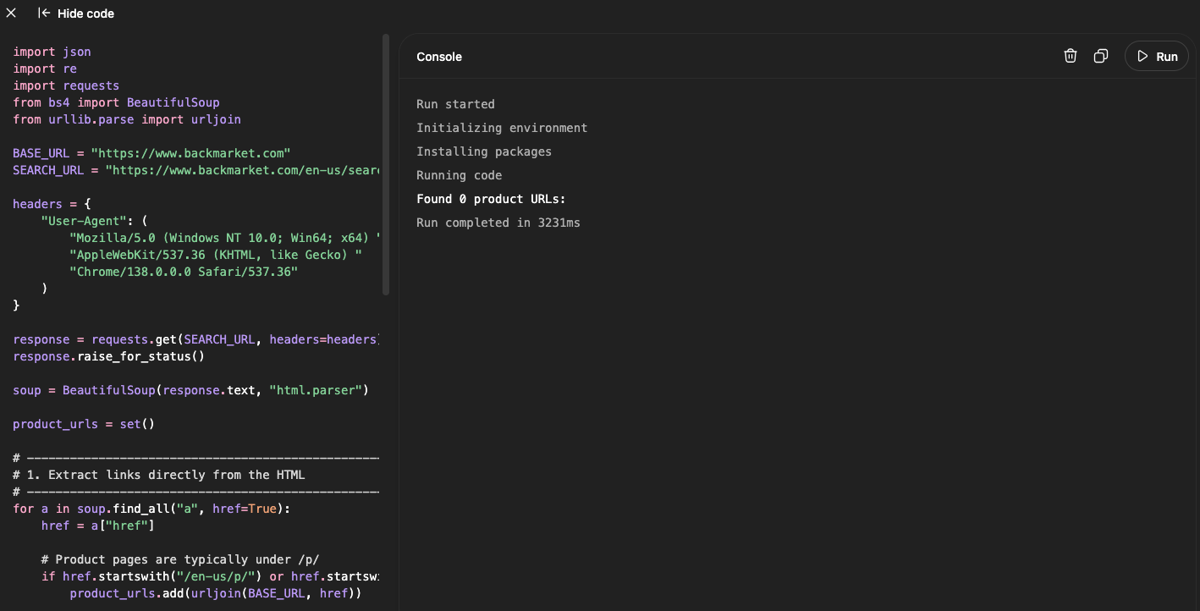
Run started
Initializing environment
Installing packages
Running code
Found 0 product URLs:
Run completed in 4373ms
In the first run, I got zero results. I tried downloading it and running it locally, but the results were the same.
I knew right away that I was getting blocked, but I gave ChatGPT a few chances to solve it with no hints. It tried, but ChatGPT was just running in circles. So I had to intervene asking for the HTML output to debug it.
I could see that it was Cloudflare protection that was blocking us. I told ChatGPT the issue, and it implemented a good solution: running a Chrome window from the terminal, like this:
/Applications/Google\ Chrome.app/Contents/MacOS/Google\ Chrome \
  --remote-debugging-port=9222 \
  --user-data-dir="$HOME/chrome-scraper-profile"
Then I run this Python code, saved as get_refurbished_iphone_urls.py:
import time
from urllib.parse import urljoin
from bs4 import BeautifulSoup
from playwright.sync_api import sync_playwright


def get_refurbished_iphone_urls():
    URL = "https://www.backmarket.com/en-us/search?q=iphone"

    with sync_playwright() as p:

        # Connect to the Chrome instance you launched above
        browser = p.chromium.connect_over_cdp(
            "http://localhost:9222"
        )

        context = browser.contexts[0]

        page = context.pages[0] if context.pages else context.new_page()

        print("Opening:", URL)

        page.goto(
            URL,
            wait_until="domcontentloaded",
            timeout=60000
        )

        print("Current URL:", page.url)
        print("Title:", page.title())

        # --------------------------------------------------
        # Give YOU time to complete Cloudflare manually.
        # --------------------------------------------------

        print()
        print("If Cloudflare shows a challenge, solve it in Chrome.")
        print("Waiting for the page to become available...")
        print()

        # Wait up to 2 minutes for the product page.
        for i in range(120):

            time.sleep(1)

            if "/search" in page.url:

                html = page.content()

                if "/en-us/p/" in html:
                    print("Products detected!")
                    break

            if i % 10 == 0:
                print(f"Waiting... {i}s")

        # --------------------------------------------------
        # BEAUTIFULSOUP DOES THE ACTUAL SCRAPING
        # --------------------------------------------------

        html = page.content()

        soup = BeautifulSoup(html, "html.parser")

        product_urls = set()

        for link in soup.find_all("a", href=True):

            href = link["href"]

            if "/en-us/p/" in href:

                product_urls.add(
                    urljoin(
                        "https://www.backmarket.com",
                        href
                    )
                )

        product_urls = sorted(product_urls)

        print()
        print("=" * 60)
        print(f"Found {len(product_urls)} product URLs")
        print("=" * 60)

        for url in product_urls:
            print(url)

        # Don't close the browser here.
        # It's your real Chrome session.

        return product_urls


if __name__ == "__main__":
    get_refurbished_iphone_urls()
And it worked! But the Python scraper has to actually open a real browser window, which can use too many resources.
In my tests, no captcha was ever requested. Thus, I just had to wait for Cloudflare to check that it's a real browser. But Cloudflare can change this and implement captchas or other security measures that require human intervention, making an automated version of this script very hard to implement.
ChatGPT-generated code for scraping Apple product data
Once the code to extract the links was ready, the next step was to write code to scrape each of these pages for the data I needed. The product page looks like this:
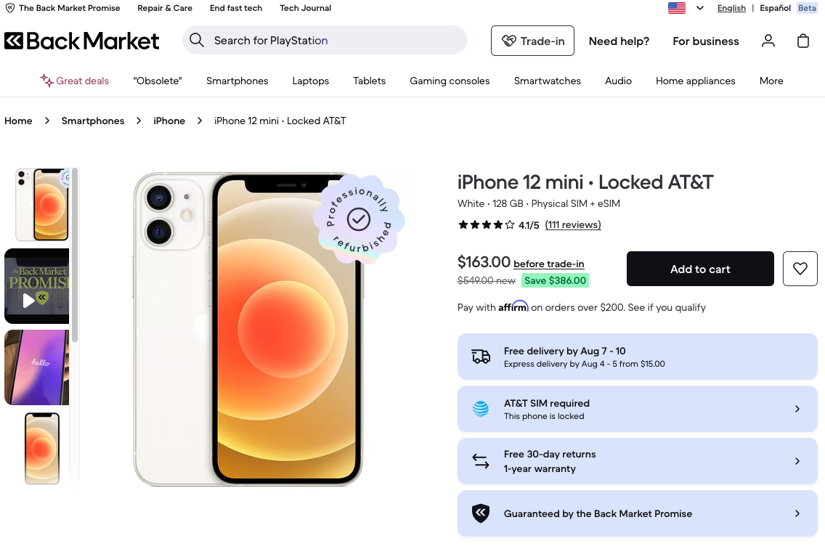
Me: @Web search Go through the source code of this webpage: https://www.backmarket.com/en-us/p/iphone-12-mini-128-gb-white-att/c8bbd410-b756-4351-ba88-f0aa138f66d9?l=11
Write a Python scraper function that takes in a URL like this and returns the following details as a dictionary with the following details:
- Input URL
- Phone Model Name
- Operating system version (current and upgradable upto)
- Screen size Phone dimensions (height, thickness and width)
- Battery capacity
- Availability of USB-C charging
- 5G availability
- Price and Stock status
- Year of release
Once this is done, write another function that can take a list of URLs, run the previous function for each URL (in parallel, using asyncio), gather the results, and make a Pandas DataFrame out of it. Finally, the code must print the Pandas DataFrame after sorting it in increasing order of screen size.
ChatGPT: Yes. I checked the actual Back Market product page. The important distinction is that Back Market supplies the listing-specific data (model/configuration, price, condition, stock), while some technical specifications are model-level data that are better maintained in a small specification map rather than pretending they come from the refurbished listing itself. The page, for example, exposes the model as “iPhone 12 mini,” price, storage, color, condition, and an “Add to cart” status.
Apple confirms the 12 mini is 5.4", 131.5 × 64.2 × 7.4 mm, uses Lightning, shipped with iOS 15, and supports 5G; Apple currently lists the 12 mini among devices compatible with iOS 26. The 2,227 mAh battery figure isn't published by Apple, so I've marked it as a third-party/ANATEL-derived specification in the code.
Here's a version I'd actually use for your experiment. It keeps BeautifulSoup as the parser and uses your already-working Chrome session, so it doesn't try to defeat Cloudflare.
(End of ChatGPT)
In this case, ChatGPT misunderstood the request. And this is actually a common issue with LLMs. I need to be more specific and give ChatGPT only one goal at a time.
It also wanted to hard-code data that was wrong: here it claims the iPhone 12 mini shipped with iOS 15, when its own earlier table correctly said iOS 14.
The code the ChatGPT web scraper suggested was just hard-coding the specs (presumably from Apple's website), which is not what I wanted. ChatGPT ignored the fact that the Back Market page contains a technical specifications table with all the information I need.
When this experiment was first run in 2025, it required a lot of back and forth to get the actual data needed. This time ChatGPT was much better at dealing with errors, and the context window is much bigger, but it still relied on my guidance to overcome some roadblocks.
Just like before, ChatGPT still made up CSS selectors, went through weird approaches, and couldn't find solutions unless I stepped in.
Here is a summary of the mistakes just in this section:
- Made up selectors
- Tried to pull data by searching for the labels. It might work, but it's very brittle for critical data.
- ChatGPT couldn't find a way forward, so I suggested using the Schema.org JSON objects
- ChatGPT couldn't read the right JSON objects. I tried pasting them three times and eventually had to give ChatGPT the exact object to look for.
- The JSON object didn't have all the specs I wanted, and ChatGPT didn't notice.
- I had to suggest a hybrid approach to get some data from the JSON objects and some from the specs table.
- It was printing a JSON, so I had to remind it we wanted a Pandas DataFrame.
The final version that did indeed work is this one, saved as gptscraping.py:
import asyncio
import json
import re
from urllib.parse import urlparse
import pandas as pd
from bs4 import BeautifulSoup
from playwright.async_api import async_playwright
CHROME_CDP_URL = "http://localhost:9222"
CONCURRENCY = 5
# ============================================================
# HELPERS
# ============================================================
def clean_url(url):
"""
Preserve the complete URL, including query parameters.
Back Market URLs can contain parameters such as ?l=11
which may identify the selected offer/configuration.
"""
return url.strip()
def normalize(value):
if value is None:
return None
return re.sub(
r"\s+",
" ",
str(value)
).strip()
def to_number(value):
"""
Extract the first numeric value from strings such as:
2,227 mAh
5.4 inches
131.5 mm
Returns None for missing/invalid values.
"""
if value is None:
return None
value = normalize(value)
if not value:
return None
# Remove thousands separators when appropriate.
value = value.replace(",", "")
match = re.search(
r"-?\d+(?:\.\d+)?",
value
)
if not match:
return None
try:
return float(match.group(0))
except (TypeError, ValueError):
return None
# ============================================================
# JSON-LD
# ============================================================
def iter_jsonld_objects(data):
"""
Yield every dictionary contained in a JSON-LD structure.
"""
if isinstance(data, dict):
yield data
for value in data.values():
yield from iter_jsonld_objects(value)
elif isinstance(data, list):
for item in data:
yield from iter_jsonld_objects(item)
def extract_jsonld_products(html):
"""
Return all Schema.org Product objects found in JSON-LD.
"""
soup = BeautifulSoup(
html,
"html.parser"
)
products = []
scripts = soup.find_all(
"script",
attrs={
"type": "application/ld+json"
}
)
for script in scripts:
raw = (
script.string
or script.get_text()
or ""
).strip()
if not raw:
continue
try:
data = json.loads(raw)
except json.JSONDecodeError:
continue
for obj in iter_jsonld_objects(data):
object_type = obj.get("@type")
if (
object_type == "Product"
or (
isinstance(object_type, list)
and "Product" in object_type
)
):
products.append(obj)
return products
def extract_product_schema(
html,
input_url
):
"""
Select the Product JSON-LD object most likely to represent
the current listing.
We prefer Products whose name appears in the URL slug and
which contain an Offer with price/availability.
If there is only one Product, use it.
If several Products exist and none can be confidently
matched, return None rather than silently selecting the
first one.
"""
products = extract_jsonld_products(html)
if not products:
return None
if len(products) == 1:
return products[0]
parsed = urlparse(input_url)
slug = (
parsed.path
.lower()
.replace("-", " ")
.replace("/", " ")
)
candidates = []
for product in products:
name = normalize(
product.get("name")
)
offers = product.get("offers")
if isinstance(offers, list):
offers = (
offers[0]
if offers
else None
)
if not isinstance(offers, dict):
continue
price = offers.get("price")
availability = offers.get(
"availability"
)
score = 0
if name:
name_lower = name.lower()
# Product name words appearing in URL slug.
name_words = [
word
for word in re.findall(
r"[a-z0-9]+",
name_lower
)
if len(word) > 2
]
score += sum(
1
for word in name_words
if word in slug
)
if price is not None:
score += 5
if availability is not None:
score += 5
candidates.append(
(score, product)
)
if not candidates:
return None
candidates.sort(
key=lambda item: item[0],
reverse=True
)
best_score = candidates[0][0]
# If the best candidate has no meaningful evidence,
# refuse to guess.
if best_score <= 0:
return None
return candidates[0][1]
def extract_jsonld_basic_data(product):
"""
JSON-LD is authoritative for:
name
price
availability
"""
result = {
"name": None,
"price": None,
"stock": None,
}
if not isinstance(product, dict):
return result
name = product.get("name")
if name is not None:
result["name"] = normalize(name)
offers = product.get("offers")
if isinstance(offers, list):
# Prefer an offer containing an actual price.
offers = next(
(
offer
for offer in offers
if isinstance(offer, dict)
and offer.get("price") is not None
),
offers[0] if offers else None
)
if not isinstance(offers, dict):
return result
price = offers.get("price")
if price is not None:
try:
result["price"] = float(
str(price).replace(",", "")
)
except (
TypeError,
ValueError
):
result["price"] = None
availability = normalize(
offers.get("availability")
)
if availability:
availability_lower = (
availability.lower()
)
if "instock" in availability_lower:
result["stock"] = "In stock"
elif (
"outofstock" in availability_lower
or "soldout" in availability_lower
):
result["stock"] = "Out of stock"
else:
result["stock"] = availability
return result
# ============================================================
# TECHNICAL SPECIFICATION CONTAINER
# ============================================================
def find_technical_section(soup):
heading = None
for element in soup.find_all(
["h2", "h3", "h4"]
):
text = normalize(
element.get_text(
" ",
strip=True
)
)
if (
text
and
"Everything you ever wanted to know"
in text
):
heading = element
break
if heading is None:
return None
container = heading
for _ in range(10):
if container is None:
break
text = normalize(
container.get_text(
" ",
strip=True
)
)
required_labels = [
"Screen size (inches)",
"Network",
"Release Year",
"Last OS Compatibility",
]
if all(
label in text
for label in required_labels
):
return container
container = container.parent
return None
# ============================================================
# TECHNICAL SPEC PARSER
# ============================================================
def extract_technical_specs(soup):
container = find_technical_section(
soup
)
if container is None:
return {}
labels = [
"Screen size (inches)",
"Last OS Compatibility",
"Release Year",
"Network",
"Connector",
"OS",
"Battery",
"Battery capacity",
"Dimensions",
"Height",
"Width",
"Thickness",
]
labels = sorted(
labels,
key=len,
reverse=True
)
specs = {}
def clean(value):
if value is None:
return None
value = normalize(value)
if not value:
return None
return value
def is_label(text):
if not text:
return False
text = normalize(text).lower()
return any(
text == label.lower()
for label in labels
)
# --------------------------------------------------------
# Strategy 1: adjacent DOM children
# --------------------------------------------------------
for element in container.find_all(
[
"div",
"li",
"dt",
"dd",
"tr",
"td",
]
):
children = list(
element.find_all(
recursive=False
)
)
if not children:
continue
if len(children) > 6:
continue
child_texts = []
for child in children:
text = clean(
child.get_text(
" ",
strip=True
)
)
if text:
child_texts.append(text)
if len(child_texts) < 2:
continue
for index, text in enumerate(
child_texts
):
if not is_label(text):
continue
label = next(
label
for label in labels
if label.lower()
== text.lower()
)
# Previous sibling.
if index > 0:
value = clean(
child_texts[index - 1]
)
if (
value
and not is_label(value)
):
specs.setdefault(
label,
value
)
continue
# Next sibling.
if index + 1 < len(
child_texts
):
value = clean(
child_texts[index + 1]
)
if (
value
and not is_label(value)
):
specs.setdefault(
label,
value
)
# --------------------------------------------------------
# Strategy 2: small combined elements
# --------------------------------------------------------
for element in container.find_all(
[
"div",
"li",
"p",
"span",
"dt",
"dd",
"td",
]
):
text = clean(
element.get_text(
" ",
strip=True
)
)
if not text:
continue
if len(text) > 100:
continue
for label in labels:
if label.lower() not in text.lower():
continue
occurrences = len(
re.findall(
re.escape(label),
text,
flags=re.IGNORECASE
)
)
if occurrences != 1:
continue
# VALUE + LABEL
pattern = re.compile(
r"^(.*?)\s*"
+ re.escape(label)
+ r"\s*$",
flags=re.IGNORECASE
)
match = pattern.match(text)
if match:
value = clean(
match.group(1)
)
if (
value
and not is_label(value)
):
specs.setdefault(
label,
value
)
continue
# LABEL + VALUE
pattern = re.compile(
r"^\s*"
+ re.escape(label)
+ r"\s*(.*?)$",
flags=re.IGNORECASE
)
match = pattern.match(text)
if match:
value = clean(
match.group(1)
)
if (
value
and not is_label(value)
):
specs.setdefault(
label,
value
)
return specs
# ============================================================
# SINGLE PHONE
# ============================================================
async def scrape_phone(
url,
page
):
result = {
"Input URL": url,
"Phone Model Name": None,
"Operating system version": None,
"Current / upgradable": None,
"Screen size (inches)": None,
"Phone dimensions": None,
"Height (mm)": None,
"Thickness (mm)": None,
"Width (mm)": None,
"Battery capacity (mAh)": None,
"USB-C charging": None,
"5G availability": None,
"Price (USD)": None,
"Stock status": None,
"Year of release": None,
}
try:
await page.goto(
clean_url(url),
wait_until="domcontentloaded",
timeout=60_000,
)
await page.wait_for_timeout(
1500
)
html = await page.content()
soup = BeautifulSoup(
html,
"html.parser"
)
# ====================================================
# JSON-LD
# ====================================================
product = extract_product_schema(
html,
url
)
jsonld = extract_jsonld_basic_data(
product
)
# These fields NEVER come from DOM.
result["Phone Model Name"] = (
jsonld["name"]
)
result["Price (USD)"] = (
jsonld["price"]
)
result["Stock status"] = (
jsonld["stock"]
)
# ====================================================
# TECHNICAL SPECIFICATIONS
# ====================================================
specs = extract_technical_specs(
soup
)
# OS
result[
"Operating system version"
] = specs.get("OS")
result[
"Current / upgradable"
] = specs.get(
"Last OS Compatibility"
)
# Screen
result[
"Screen size (inches)"
] = to_number(
specs.get(
"Screen size (inches)"
)
)
# Connector
connector = specs.get(
"Connector"
)
if connector is not None:
connector_lower = (
connector.lower()
)
result[
"USB-C charging"
] = (
"usb-c" in connector_lower
or "usb c" in connector_lower
)
# Network
network = specs.get(
"Network"
)
if network is not None:
result[
"5G availability"
] = (
"5g" in network.lower()
)
# Release year
release_year = to_number(
specs.get(
"Release Year"
)
)
if release_year is not None:
result[
"Year of release"
] = int(release_year)
# Battery
battery = (
specs.get(
"Battery capacity"
)
or specs.get("Battery")
)
if battery is not None:
result[
"Battery capacity (mAh)"
] = to_number(
battery
)
# Dimensions
height = to_number(
specs.get("Height")
)
width = to_number(
specs.get("Width")
)
thickness = to_number(
specs.get("Thickness")
)
result["Height (mm)"] = height
result["Width (mm)"] = width
result["Thickness (mm)"] = thickness
if (
height is not None
and width is not None
and thickness is not None
):
result[
"Phone dimensions"
] = (
f"{height:g} × "
f"{width:g} × "
f"{thickness:g} mm"
)
return result
except Exception as e:
result["Stock status"] = (
f"ERROR: "
f"{type(e).__name__}: {e}"
)
return result
# ============================================================
# PARALLEL SCRAPER
# ============================================================
async def scrape_phones(
urls,
concurrency=CONCURRENCY
):
"""
Scrape multiple URLs in parallel.
Returns a Pandas DataFrame sorted by screen size.
"""
semaphore = asyncio.Semaphore(
concurrency
)
async with async_playwright() as p:
browser = await p.chromium.connect_over_cdp(
CHROME_CDP_URL
)
if not browser.contexts:
raise RuntimeError(
"No Chrome context found. "
"Start Chrome with "
"--remote-debugging-port=9222"
)
context = browser.contexts[0]
async def scrape_one(url):
async with semaphore:
page = await context.new_page()
try:
return await scrape_phone(
url,
page
)
finally:
await page.close()
results = await asyncio.gather(
*[
scrape_one(url)
for url in urls
]
)
df = pd.DataFrame(
results
)
if (
"Screen size (inches)"
in df.columns
):
df[
"Screen size (inches)"
] = pd.to_numeric(
df[
"Screen size (inches)"
],
errors="coerce"
)
df = df.sort_values(
by="Screen size (inches)",
ascending=True,
na_position="last"
)
return df.reset_index(
drop=True
)
# ============================================================
# MAIN
# ============================================================
if __name__ == "__main__":
urls = [
"https://www.backmarket.com/en-us/p/"
"iphone-12-mini-128-gb-white-att/"
"c8bbd410-b756-4351-ba88-f0aa138f66d9?l=11",
]
df = asyncio.run(
scrape_phones(
urls,
concurrency=5
)
)
print()
print(
df.to_string(
index=False
)
)
Generating price monitoring code with ChatGPT
The next step was to see if I could make the code deployable. It has to run each day and output the options I can buy in a markdown file. I asked ChatGPT to add this feature.
Me: I need some updates to the previous scraping code to make it a price monitor. Here's what I need:
- Filter the table, showing only the entries with the lowest price for that model name
- For the model name, exclude the color. So you can break the name at the hyphen and take only the first part.
- Make this a price monitor. This script needs to be run every day. So, write another program that calls the first program's function to get the URLs, scrapes all the URLs, and stores the result in memory. This must be in an infinite loop, running once per day. Any changes or new listings from the previous day must be dumped as a markdown file, with the date in the filename.
The get_refurbished_iphone_urls.py file generates the links, and the gptscraping.py file loads each of the links.
Now ChatGPT generated a price_monitor.py file, that uses these two. The price monitor is supposed to run the whole thing in an infinite loop, once per day. The price monitor file prints results, and saves the JSON output to disk.
This is the final code for price_monitor.py:
import asyncio
import json
import time
from datetime import datetime
from pathlib import Path
import math
from gptscraping import scrape_phones
from get_refurbished_iphone_urls import (
get_refurbished_iphone_urls
)
# ============================================================
# CONFIGURATION
# ============================================================
# Production:
RUN_INTERVAL_SECONDS = 24 * 60 * 60
# Debugging:
#
# RUN_INTERVAL_SECONDS = 10
#
# ------------------------------------------------------------
CONCURRENCY = 5
STATE_FILE = Path(
"previous_snapshot.json"
)
REPORT_DIR = Path(
"price_monitor"
)
MIN_SUCCESS_RATE = 0.90
# ============================================================
# MODEL NAME
# ============================================================
def normalize_model_name(name):
"""
Normalize a Back Market product name to the phone model.
Examples:
iPhone 12 mini 64GB - Black - Unlocked
-> iPhone 12 mini
iPhone 14 Pro Max 128GB - Deep Purple
-> iPhone 14 Pro Max
iPhone SE (2022) 64GB - Starlight
-> iPhone SE (2022)
"""
if not name:
return None
name = str(name).strip()
# Match the actual phone family and stop before storage.
match = __import__("re").match(
r"^(iPhone\s+"
r"(?:"
r"SE(?:\s+\(?(?:2016|2020|2022)\)?)?"
r"|"
r"\d+[se]?\b(?:\s+"
r"(?:mini|Plus|Pro(?:\s+Max)?|e)"
r")?"
r")"
r")\b",
name,
flags=__import__("re").IGNORECASE
)
if match:
return match.group(1).strip()
# Conservative fallback.
return name.split(
"-",
1
)[0].strip()
# ============================================================
# LOWEST PRICE PER MODEL
# ============================================================
def get_lowest_price_per_model(
records
):
"""
Keep the cheapest listing for each phone model,
regardless of storage/color.
"""
cheapest = {}
for item in records:
model = normalize_model_name(
item.get(
"Phone Model Name"
)
)
price = item.get(
"Price (USD)"
)
if not model:
continue
if price is None:
continue
try:
price = float(price)
except (
TypeError,
ValueError
):
continue
candidate = item.copy()
candidate[
"Phone Model Name"
] = model
candidate[
"Price (USD)"
] = price
existing = cheapest.get(
model
)
if (
existing is None
or price < existing[
"Price (USD)"
]
):
cheapest[model] = candidate
result = list(
cheapest.values()
)
result.sort(
key=lambda item:
item[
"Phone Model Name"
].lower()
)
return result
# ============================================================
# VALIDATION
# ============================================================
def validate_scrape(
urls,
records,
expected_success_rate=MIN_SUCCESS_RATE
):
"""
Validate the entire scrape BEFORE it can become
the new baseline.
This protects against partial/failed scrapes.
"""
expected_count = len(
urls
)
result_count = len(
records
)
if result_count != expected_count:
return (
False,
(
f"Expected {expected_count} "
f"results but received "
f"{result_count}."
)
)
required_fields = [
"Input URL",
"Phone Model Name",
"Price (USD)",
"Stock status",
]
valid_count = 0
seen_urls = set()
errors = []
for item in records:
url = item.get(
"Input URL"
)
missing = []
for field in required_fields:
value = item.get(
field
)
if (
value is None
or value == ""
):
missing.append(field)
stock = item.get(
"Stock status"
)
if (
isinstance(stock, str)
and stock.startswith(
"ERROR:"
)
):
missing.append(
"scrape error"
)
if url in seen_urls:
errors.append(
f"Duplicate URL: {url}"
)
seen_urls.add(
url
)
if missing:
errors.append(
f"{url}: "
+ ", ".join(
missing
)
)
else:
valid_count += 1
success_rate = (
valid_count / expected_count
if expected_count
else 0
)
if success_rate < expected_success_rate:
return (
False,
(
f"Only {valid_count}/"
f"{expected_count} "
f"({success_rate:.1%}) "
f"scrapes succeeded. "
f"Minimum required is "
f"{expected_success_rate:.1%}."
)
)
if errors:
preview = "\n".join(
errors[:5]
)
return (
False,
(
"Scrape validation found "
"invalid results:\n"
+ preview
)
)
return (
True,
(
f"Validation passed: "
f"{valid_count}/"
f"{expected_count} "
f"({success_rate:.1%})."
)
)
def make_json_safe(obj):
"""
Recursively convert NaN/Inf values into None so that the
snapshot is valid JSON.
"""
if isinstance(obj, dict):
return {
k: make_json_safe(v)
for k, v in obj.items()
}
if isinstance(obj, list):
return [
make_json_safe(v)
for v in obj
]
if isinstance(obj, float):
if math.isnan(obj) or math.isinf(obj):
return None
return obj
# ============================================================
# PERSISTENCE
# ============================================================
def save_state(records):
records = make_json_safe(records)
temporary_file = STATE_FILE.with_suffix(".tmp")
with open(
temporary_file,
"w",
encoding="utf-8"
) as f:
json.dump(
records,
f,
indent=2,
ensure_ascii=False,
allow_nan=False
)
temporary_file.replace(STATE_FILE)
def load_previous_state():
if not STATE_FILE.exists():
return []
try:
with open(
STATE_FILE,
"r",
encoding="utf-8"
) as f:
data = json.load(f)
if not isinstance(
data,
list
):
raise ValueError(
"State file is not a list."
)
return data
except Exception as e:
print(
f"⚠️ Could not load previous "
f"state: {e}"
)
return []
# ============================================================
# COMPARISON
# ============================================================
def compare_results(
previous,
current
):
"""
Detect:
🆕 New models
🔄 Changed models
❌ Removed models
"""
previous_by_model = {
item.get(
"Phone Model Name"
): item
for item in previous
if item.get(
"Phone Model Name"
)
}
current_by_model = {
item.get(
"Phone Model Name"
): item
for item in current
if item.get(
"Phone Model Name"
)
}
new_items = []
changed_items = []
removed_items = []
# ========================================================
# NEW
# ========================================================
for model, current_item in (
current_by_model.items()
):
if model not in previous_by_model:
new_items.append(
current_item
)
# ========================================================
# REMOVED
# ========================================================
for model, previous_item in (
previous_by_model.items()
):
if model not in current_by_model:
removed_items.append(
previous_item
)
# ========================================================
# CHANGED
# ========================================================
fields_to_compare = [
"Price (USD)",
"Stock status",
"Input URL",
]
for model, current_item in (
current_by_model.items()
):
previous_item = (
previous_by_model.get(
model
)
)
if previous_item is None:
continue
changes = {}
for field in fields_to_compare:
old_value = previous_item.get(
field
)
new_value = current_item.get(
field
)
if old_value != new_value:
changes[field] = {
"old": old_value,
"new": new_value,
}
if changes:
changed_item = (
current_item.copy()
)
changed_item[
"_changes"
] = changes
changed_items.append(
changed_item
)
return {
"new": new_items,
"changed": changed_items,
"removed": removed_items,
}
# ============================================================
# MARKDOWN
# ============================================================
def markdown_value(value):
if value is None:
return ""
return str(value).replace(
"|",
"\\|"
)
def write_monitor_report(
changes,
output_dir=REPORT_DIR
):
"""
Save a unique report for every run.
Example:
price_monitor/
2026-08-05_101530.md
2026-08-05_235901.md
"""
new_items = changes[
"new"
]
changed_items = changes[
"changed"
]
removed_items = changes[
"removed"
]
if not (
new_items
or changed_items
or removed_items
):
return None
output_path = Path(
output_dir
)
output_path.mkdir(
parents=True,
exist_ok=True
)
timestamp = datetime.now().strftime(
"%Y-%m-%d_%H%M%S"
)
filename = (
output_path
/ f"{timestamp}.md"
)
lines = []
lines.append(
"# 📱 Back Market Price Monitor"
)
lines.append("")
lines.append(
f"**Run:** {timestamp}"
)
lines.append("")
# ========================================================
# NEW
# ========================================================
if new_items:
lines.append(
"## 🆕 New models"
)
lines.append("")
lines.append(
"| 📱 Model | 💰 Price | 📦 Stock | 📐 Screen | 🔗 Link |"
)
lines.append(
"|---|---:|---|---:|---|"
)
for item in new_items:
lines.append(
"| "
+ markdown_value(
item.get(
"Phone Model Name"
)
)
+ " | $"
+ markdown_value(
item.get(
"Price (USD)"
)
)
+ " | "
+ markdown_value(
item.get(
"Stock status"
)
)
+ " | "
+ markdown_value(
item.get(
"Screen size (inches)"
)
)
+ " | "
+ f"[Open listing]("
f"{item.get('Input URL')}"
f") |"
)
lines.append("")
# ========================================================
# CHANGED
# ========================================================
if changed_items:
lines.append(
"## 🔄 Changed models"
)
lines.append("")
for item in changed_items:
lines.append(
f"### 📱 "
f"{item.get('Phone Model Name')}"
)
lines.append("")
lines.append(
f"[🔗 Open listing]("
f"{item.get('Input URL')}"
f")"
)
lines.append("")
for field, change in item[
"_changes"
].items():
old = change[
"old"
]
new = change[
"new"
]
if field == "Price (USD)":
if (
old is not None
and new is not None
):
if new < old:
emoji = "📉"
elif new > old:
emoji = "📈"
else:
emoji = "💰"
else:
emoji = "💰"
lines.append(
f"- {emoji} **Price:** "
f"${old} → **${new}**"
)
elif field == "Stock status":
lines.append(
f"- 📦 **Stock:** "
f"{old} → **{new}**"
)
elif field == "Input URL":
lines.append(
"- 🔗 **Listing changed**"
)
lines.append("")
# ========================================================
# REMOVED
# ========================================================
if removed_items:
lines.append(
"## ❌ Removed models"
)
lines.append("")
lines.append(
"| 📱 Model | Previous price | Previous stock |"
)
lines.append(
"|---|---:|---|"
)
for item in removed_items:
lines.append(
"| "
+ markdown_value(
item.get(
"Phone Model Name"
)
)
+ " | $"
+ markdown_value(
item.get(
"Price (USD)"
)
)
+ " | "
+ markdown_value(
item.get(
"Stock status"
)
)
+ " |"
)
lines.append("")
# ========================================================
# SUMMARY
# ========================================================
lines.append("---")
lines.append("")
lines.append(
f"🆕 New: **{len(new_items)}**"
)
lines.append(
f"🔄 Changed: **{len(changed_items)}**"
)
lines.append(
f"❌ Removed: **{len(removed_items)}**"
)
markdown = "\n".join(
lines
)
filename.write_text(
markdown,
encoding="utf-8"
)
# Display the same report in terminal.
print()
print("=" * 70)
print("📝 PRICE MONITOR REPORT")
print("=" * 70)
print()
print(markdown)
print()
print("=" * 70)
print(
f"💾 Report saved to: {filename}"
)
print("=" * 70)
return filename
# ============================================================
# ONE RUN
# ============================================================
async def run_once():
print()
print("=" * 70)
print(
f"🚀 RUN "
f"{datetime.now():%Y-%m-%d %H:%M:%S}"
)
print("=" * 70)
# ========================================================
# GET URLS
# ========================================================
print()
print(
"🔎 Getting refurbished iPhone URLs..."
)
# get_refurbished_iphone_urls uses the synchronous
# Playwright API, so run it outside the asyncio loop.
urls = await asyncio.to_thread(
get_refurbished_iphone_urls
)
print(
f"📋 Found {len(urls)} product URLs."
)
if not urls:
raise RuntimeError(
"URL collector returned zero URLs."
)
# ========================================================
# SCRAPE
# ========================================================
print()
print(
f"📱 Scraping {len(urls)} products..."
)
df = await scrape_phones(
urls,
concurrency=CONCURRENCY
)
if df.empty:
raise RuntimeError(
"Scraper returned an empty DataFrame."
)
# The scraper's required user-facing output.
print()
print(
"📊 SCRAPED DATAFRAME "
"(sorted by screen size)"
)
print("=" * 70)
print(
df.to_string(
index=False
)
)
# Convert DataFrame to records for
# validation/comparison/persistence.
records = df.to_dict(
orient="records"
)
records = make_json_safe(records)
# ========================================================
# VALIDATE
# ========================================================
print()
print(
"🔍 Validating scrape..."
)
valid, message = validate_scrape(
urls,
records,
expected_success_rate=MIN_SUCCESS_RATE
)
print(
f"🔍 {message}"
)
if not valid:
print()
print(
"❌ SCRAPE VALIDATION FAILED"
)
print(
"⚠️ Previous snapshot "
"will NOT be overwritten."
)
return
# ========================================================
# LOWEST PRICE PER MODEL
# ========================================================
current = get_lowest_price_per_model(
records
)
if not current:
raise RuntimeError(
"No valid models remained "
"after processing."
)
print()
print(
f"💰 Tracking "
f"{len(current)} unique phone models."
)
# ========================================================
# PREVIOUS STATE
# ========================================================
previous = load_previous_state()
if not previous:
print()
print(
"ℹ️ No previous snapshot found."
)
save_state(
current
)
print(
f"💾 Initial snapshot saved to "
f"{STATE_FILE}"
)
return
print()
print(
f"📂 Loaded previous snapshot: "
f"{len(previous)} models."
)
# ========================================================
# COMPARE
# ========================================================
changes = compare_results(
previous,
current
)
new_count = len(
changes["new"]
)
changed_count = len(
changes["changed"]
)
removed_count = len(
changes["removed"]
)
print()
print(
f"🆕 New: {new_count}"
)
print(
f"🔄 Changed: {changed_count}"
)
print(
f"❌ Removed: {removed_count}"
)
# ========================================================
# REPORT
# ========================================================
if (
new_count
or changed_count
or removed_count
):
write_monitor_report(
changes
)
else:
print()
print(
"✅ No changes detected."
)
# ========================================================
# SAVE BASELINE
# ========================================================
# This is deliberately the LAST operation.
#
# If anything above fails, the previous baseline
# remains untouched.
save_state(
current
)
print()
print(
f"💾 Snapshot saved to "
f"{STATE_FILE}"
)
# ============================================================
# INFINITE MONITOR
# ============================================================
async def main():
print()
print("=" * 70)
print(
"📱 BACK MARKET PRICE MONITOR"
)
print("=" * 70)
print(
f"⏱️ Interval: "
f"{RUN_INTERVAL_SECONDS} seconds"
)
print(
f"💾 State: "
f"{STATE_FILE}"
)
print(
f"📝 Reports: "
f"{REPORT_DIR}/"
)
print("=" * 70)
while True:
started_at = time.time()
try:
await run_once()
except KeyboardInterrupt:
print()
print(
"👋 Monitor stopped."
)
break
except Exception as e:
print()
print(
"❌ ERROR:"
)
print(
repr(e)
)
print(
"⚠️ Previous snapshot "
"was NOT overwritten."
)
elapsed = (
time.time()
- started_at
)
sleep_seconds = max(
0,
RUN_INTERVAL_SECONDS
- elapsed
)
print()
print(
f"😴 Sleeping for "
f"{sleep_seconds:.1f} seconds..."
)
try:
await asyncio.sleep(
sleep_seconds
)
except KeyboardInterrupt:
print()
print(
"👋 Monitor stopped."
)
break
# ============================================================
# ENTRY POINT
# ============================================================
if __name__ == "__main__":
asyncio.run(
main()
)
On its first run, price_monitor.py extracts the product URLs, scrapes each product page, validates the dataset, and creates previous_snapshot.json as the initial baseline before going to sleep until the next scheduled interval.
It's worth mentioning that the sleep timer isn't the best option in the long term. You can replace it with a cron job for better results.
In the end, the ChatGPT web scraper saves the raw scrape results to a JSON file, which you can use to build a table. For example, save this to output.py and run it:
import pandas as pd

# 1. Load JSON directly from file
df = pd.read_json("previous_snapshot.json")

# 2. Filter for small phones (<= 6.0 inches) and sort by price
filtered_df = (
    df[df["Screen size (inches)"].notna() & (df["Screen size (inches)"] <= 6.0)]
    .sort_values(by="Price (USD)", ascending=True)
)

# 3. Display formatted console output
columns_to_show = [
    "Phone Model Name",
    "Screen size (inches)",
    "Price (USD)",
    "Year of release",
    "5G availability"
]

print("\n" + "="*80)
print("SMALL PHONES (<= 6 INCHES) ORDERED BY PRICE")
print("="*80)
print(filtered_df[columns_to_show].to_string(index=False))
This is the result when you run it:
================================================================================
SMALL PHONES (<= 6 INCHES) ORDERED BY PRICE
================================================================================
     Phone Model Name  Screen size (inches)  Price (USD)  Year of release  5G availability
       iPhone 6s 16GB                   4.7         61.0           2015.0              0.0
        iPhone 7 32GB                   4.7         69.0           2016.0              0.0
iPhone SE (2020) 64GB                   4.7        114.0           2020.0              0.0
iPhone SE (2022) 64GB                   4.7        127.0           2022.0              1.0
  iPhone 12 mini 64GB                   5.4        171.0           2020.0              1.0
 iPhone 13 mini 128GB                   5.4        249.0           2021.0              1.0
After all this work, I wanted to compare the different code versions that the ChatGPT web scraper went through.
If you try to scrape the ChatGPT page directly with ChatGPT itself, that won't work. But you can just ask it to summarize the conversation, and it will do it (including a changelog.md if needed).
Doing the same job with one command
The core idea here was to perform web scraping with minimal to no coding. I was able to create a ChatGPT web scraper, but it defeats its own purpose when it requires extensive coding knowledge to guide the tool.
For this reason, using a web scraping API such as ScrapingBee is probably a better option. It doesn't require the knowledge or effort needed to build and maintain a scraper like the ChatGPT scraper. You can even use the ScrapingBee CLI to create the whole web scraper (including the scheduling option) in just a couple of commands.
Open your terminal, and if you haven't already, install the ScrapingBee CLI with:
pip install scrapingbee-cli
Then authenticate it with your API key (sign up for 1,000 free credits to see how it works):
scrapingbee auth --api-key YOUR_API_KEY
The very first Python script I created (get_refurbished_iphone_urls.py) can be replaced entirely with this command:
scrapingbee scrape "https://www.backmarket.com/en-us/search?q=iphone" --render-js true --block-resources false --stealth-proxy true --country-code us --extract-rules '{"urls": {"selector": "a[href*=\"/en-us/p/\"]", "type": "list", "output": "@href"}}' --output-file product_urls.json
The CLI command uses flags to pass the options you want to use in your scraping task. You can save your own settings to avoid sending common options over and over (such as block resources or rendering JS).
After that, the product_urls.json looks like this:
{
   "urls":[
      "/en-us/p/iphone-12-64-gb-black-unlocked/233eb774-20da-4381-8392-04d3e945b9da?l=12",
      "/en-us/p/iphone-16-128-gb-black-unlocked/1cc63d15-bcc7-4068-b203-2ddcf6c74167?l=11",
      "/en-us/p/iphone-11-64-gb-black-unlocked-gsm/49fbcceb-6d56-42e4-8ccc-b7bb1dfa8ae4?l=12",
      "/en-us/p/iphone-12-mini-64-gb-black-unlocked/60012175-0180-4341-8f6e-1af9f8cdf523?l=12",
      "/en-us/p/iphone-16-pro-max-256-gb-black-titanium-unlocked/9b7b992c-fbdc-4a9b-bcb2-058ee3108644?l=12",
      "/en-us/p/iphone-11-pro-max-64-gb-space-gray-unlocked/70135bb2-cdc4-4ef4-9de4-4afc58f16860?l=12",
      "/en-us/p/iphone-13-128-gb-blue-fully-unlocked-gsm-cdma/94222415-fcc0-4c03-99df-4edc011178f0?l=12",
      "/en-us/p/iphone-12-pro-128-gb-graphite-unlocked/e19e0bad-531b-4bcc-af24-d6a066359f76?l=12"
   ]
}
After that, run this command to save the URLs, including the protocol and website address, to a TXT file:
jq -r '.urls[] | "https://www.backmarket.com" + .' product_urls.json > urls.txt
When creating the gptscraping.py file I had to pick between Schema.org JSON and a text-search approach for the product specs. The JSON is more stable, but it doesn't contain all the data I needed.
But with the ScrapingBee API you can use the ai-extract-rules. It allows you to write in plain English what kind of data you want, and it's smart enough to detect text variations and pull data from the page.
Here is an example:
scrapingbee scrape --input-file urls.txt --render-js true --block-resources false --stealth-proxy true --country-code us --ai-extract-rules '{"phone_model": "Phone Model Name", "screen_size": "Screen size in inches as float", "price": "Current sale price in USD as float", "year": "Release year as integer", "is_5g": "Boolean if 5G compatible"}' --output-format csv --output-file refurbished_iphones.csv
Here AI extract rules get the model, screen size, price and other variables at once.
It's worth mentioning that if you get an error like "Got more than 8190 bytes when reading" it's because of the CLI's header limits. In this case you can just switch to a simple Python script using the same AI extract rules and it will work just fine.
There are other ScrapingBee CLI commands and options that can make your ChatGPT web scraper better:
- crawl - Automatically discover URLs, such as
scrapingbee crawl "https://example.com" - schedule - Schedule scraping jobs, such as
scrapingbee schedule --every 24h - concurrency - Parallelize requests to scrape large lists faster, for example,
scrapingbee scrape --input-file urls.txt --concurrency 5
How to scrape ChatGPT's response
Sometimes when people think of a ChatGPT web scraper, they mean scraping ChatGPT's answers.
An easy option to do it is using the ScrapingBee ChatGPT scraper API. It allows you to run a Python function or a CLI command and you can get the ChatGPT answer:
scrapingbee chatgpt 'how to make pasta'
The result is something like this:
{
   "full_html":"",
   "llm_model":"gpt-5-5",
   "prompt":"how to make pasta",
   "results_json":[
      {
         "children":[
            {
               "raw":"Here's a simple and delicious way to make a basic pasta with tomato sauce.",
               "type":"text"
            }
         ],
         "type":"paragraph"
      },
(the answer goes on for many, many lines)
}
It's possible to do the same task by scraping the page. It is less stable, because you need the correct selectors and any code or design changes can break your ChatGPT scraper. But here is an example:
import json
import requests

prompt_text = "How to cook a pizza? Be very brief!"
safe_prompt = json.dumps(prompt_text)

js_instructions = {
    "instructions": [
        {"wait_for": "div#prompt-textarea"},
        {
            "evaluate": f"""
                const el = document.querySelector('div#prompt-textarea');
                if (el) {{
                    el.textContent = {safe_prompt};
                    el.dispatchEvent(new Event('input', {{ bubbles: true }}));
                }}
            """
        },
        {"wait": 1000},
        {
            "evaluate": """
                const btn = document.querySelector('button[data-testid="send-button"]') || document.querySelector('button[aria-label="Send prompt"]');
                if (btn) { btn.click(); }
            """
        },
        {"wait_for": "div[data-message-author-role='assistant'] div.markdown"},
        {"wait": 5000}
    ]
}

try:
    response = requests.get(
        url='https://app.scrapingbee.com/api/v1',
        headers={'Authorization': 'Bearer YOUR-API-KEY'},
        params={
            'url': 'https://chatgpt.com',
            'stealth_proxy': 'true',
            'render_js': 'true',
            'block_resources': 'false',
            'js_scenario': json.dumps(js_instructions),
            'extract_rules': json.dumps({
                "response": {
                    "selector": "div[data-message-author-role='assistant'] div.markdown",
                    "type": "list"
                }
            })
        },
        timeout=120
    )

    response.raise_for_status()

    data = response.json()
    extracted_list = data.get("response", [])

    if not extracted_list:
        print("Error: Request succeeded but no response was extracted (possible rate-limit or auth-block).")
    else:
        latest_response = extracted_list[-1]
        print(latest_response)

except requests.exceptions.HTTPError as e:
    print(f"HTTP Error ({response.status_code}): {e}")
except requests.exceptions.Timeout:
    print("Error: ScrapingBee request timed out.")
except Exception as e:
    print(f"Unexpected Error: {e}")
When ChatGPT is the right tool for scraping
You can use ChatGPT for web scraping, but not in the way you'd expect.
As you saw in this test, ChatGPT can extract some data via the chat interface, but it is unreliable. When using chat, ChatGPT pulls the wrong data, relies on cached pages instead of real-time information, and it can give wrong answers with absolute confidence.
Still, ChatGPT for web scraping works when it's used to generate a web scraper for you.
Simply put:
- What it's good at: ChatGPT can write a web scraper, or at least the first version of it. Additionally, ChatGPT is good at finding possible solutions to issues if you point it in the right direction.
- Where it fails: ChatGPT failed to scrape live data in chat, and when coding, it didn't apply good practices such as rate limiting or proxy rotation, it didn't get the CSS selectors right, and it didn't parse pages from a list automatically. ChatGPT is also very confident, even when it's absolutely wrong.
Therefore, if you know how web scraping works, ChatGPT can speed up your work significantly. If you are a novice in the web scraping field, ChatGPT can hinder your learning process and make things even harder.
A good alternative is a tool such as the ScrapingBee scraping API, or the ScrapingBee CLI that wraps it. (ScrapingBee is the company behind this blog.) With it, you can buy plans with different amounts of credits and use some credits for each of your requests. It can handle JavaScript rendering, proxies, anti-bot checks, and scheduling tasks. You can read more about it in our scraping API docs.
Frequently asked questions
Can ChatGPT scrape websites?
ChatGPT can scrape websites for very simple tasks, particularly with web search enabled. But it can fail to follow a set of instructions and return false data with the same confidence with which it returns real data. It's hard to fully rely on ChatGPT, but you can use it to help you code a web scraper, which will give you more consistent results.
How do you use ChatGPT for web scraping?
You can use ChatGPT to build a web scraper for you. Give ChatGPT the target URL, fields, and output format, and it can return some Python code that you can test and debug. If possible, use some structured data, such as XML or JSON-LD, instead of relying on CSS selectors. You might need to steer it in the right direction and help it fix some issues, though.
What is vibe scraping?
The term vibe scraping comes from the idea of vibe coding applied to web scraping. This technique relies on an LLM to handle the entire web scraping process using only natural language. It's an interesting idea, but web scraping is a complex task, and in most cases, AI can't deal with all the technical complexities involved in web scraping. Vibe scraping can fail to identify the correct selector, load the wrong links, and get blocked.
How do you scrape ChatGPT's responses?
The best way to scrape ChatGPT responses is to use a scraping API instead of scraping it manually. When you manually scrape ChatGPT, you need to rely on internal selectors that change often. You can use the ScrapingBee CLI with the ScrapingBee ChatGPT scraper API and perform this task with a single command in your terminal. It's worth mentioning that you don't need to know how to code to use it. You can check the tutorials and docs for simple commands to scrape AI replies at scale.
Why does ChatGPT get CSS selectors wrong?
ChatGPT and other LLMs work like an autocomplete with many parameters. For this reason, they don't really understand the current page's structure; they compare it with other similar texts and guess what kind of structure it's likely to have. If you want better results, you can give them the actual page source or use other structured data formats, such as JSON-LD, which are more stable than CSS selectors and less prone to breaking when a site is redesigned. Another idea is to use AI selectors, such as the AI extract rules in the ScrapingBee API.
Is ChatGPT-generated scraper code safe to run?
ChatGPT generates code that can ignore common issues and return false or inaccurate data. Always check it as if it were the first draft of human-written code. Make sure it does what it is supposed to do. In particular, test how it actually loads the page, whether it sends rate-limited requests, how it handles getting blocked, whether the correct data points are being loaded, and how it handles unexpected errors.