In this guide, we explain how to bypass PerimeterX bot protection in 2026. We'll cover how the system works, what triggers blocks, and the practical techniques you can use to avoid detection.
Before we get started, please note: In 2024, PerimeterX was rebranded to HUMAN Security, but its core detection methods largely remain the same.
TL;DR: PerimeterX bypass in a nutshell
To bypass PerimeterX in 2026, your requests must behave like a real user across every layer at once, including IP quality, TLS and HTTP signals, browser fingerprint, session continuity, and on-page behavior. The most reliable approach is to use real browser environments or scraping APIs that handle these signals together, rather than trying to patch individual issues.
Key takeaways
- PerimeterX uses a multi-layer detection system (IP, TLS, headers, fingerprint, session, behavior), not a single check
- IP reputation alone is not enough. Even clean residential proxies can fail if other signals look off
- TLS and HTTP-level signals can expose bots early, often before full page interaction
- Browser fingerprinting relies on many small attributes that must stay consistent and realistic
- HTTP headers and protocol details (like header order and HTTP/2) are common signals used to detect scrapers
- Session continuity matters. Cookies, tokens, and request flow must stay consistent across requests
- Behavioral patterns are monitored. Speed, navigation flow, and interactions can trigger challenges
- Most failures happen due to signal mismatches between layers, not a single mistake
- Scraping APIs and stealth browsers work best because they align all signals automatically
What is PerimeterX?
PerimeterX is a bot protection system that detects and blocks automated traffic, including web scrapers. It combines browser fingerprinting, behavioral analysis, and network-level signals to determine whether a request comes from a real user or a bot.
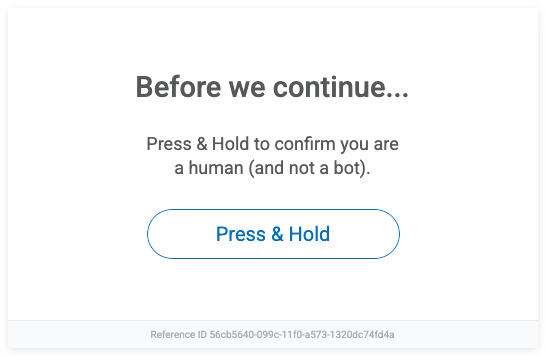
If flagged, you'll typically encounter a challenge such as the "Press & Hold to confirm you are human" prompt. This multi-layered approach makes PerimeterX more difficult to bypass than basic anti-bot systems. According to their docs, it's a "simple, no-hassle challenge", but not to my fellow scraping enthusiasts. While PerimeterX doesn't publicly reveal all its inner workings, we can still look at some of the key signals it uses to tell humans apart from bots.
You'll mostly find PerimeterX on large high-traffic sites like e-commerce, ticketing, login forms, and any place where bots cause (financial) damage. According to builtwith.com PerimeterX powers over 29,650 websites, including giants like Timberland, Zillow, Fiverr, Autozone, ASDA, Wilson and many more.
In theory, it can catch anything from basic scrapers to more advanced headless browsers pretending to be regular users. And it keeps evolving and stays one step ahead of scrapers that are getting smarter too. Overkill? Maybe not, considering recent studies reveal that nearly half of all internet traffic comes from bots. Talk about dead Internet theory...
Anyway, understanding how PerimeterX works is essential if you want to reliably bypass PerimeterX bot protection and access these targets at scale.
Learn how to scrape the web without getting blocked in our blog.
How PerimeterX detects bots
Before we dive into bypassing PerimeterX (or "HUMAN", if you prefer the new name), it's worth understanding how it actually works.
Disclaimer: some of this might get a bit technical — PerimeterX doesn't rely on a single trick, but a whole toolbox of detection methods. It doesn't evaluate signals in isolation. It looks for mismatches between the layers, e.g. browser fingerprint vs TLS vs IP.
Think of PerimeterX protection as a gatekeeper. It checks a bunch of markers to figure out if you're a real person or just another bot. It gathers data from your browser, network, and how you behave on the page — then digests all of that into a trust score. Based on that score, you're either allowed in like a normal user or hit with a challenge page. Obviously, when scraping the goal is to stay under the radar and avoid triggering those checks. No one enjoys surprise CAPTCHAs and extra challenges, which we'll show you how to avoid.
IP filtering
Let's start with one of the oldest tricks in the book: checking your IP address. PerimeterX looks at where the request comes from — not just the country or city, but also what kind of IP it is, and it uses that info to decide if you look like a bot.
Quick refresher in case IPs sound confusing: your IP address is like a label your device (or bot, or proxy) wears when it goes online. It tells websites where to send information back — but it can also be used to judge who you are. If your IP looks like bot traffic, PerimeterX is going to be suspicious.
Not all IPs are treated the same:
- Residential IPs come from real homes. These usually look safe to PerimeterX.
- Mobile IPs are from mobile networks. They're also seen as "human", and because lots of people share them, they're harder to track.
- Datacenter IPs come from big server farms like AWS or Google Cloud. These are fast and cheap — but way too common for bots, so they're usually flagged.
- VPNs and public proxies also often get blocked, especially the well-known or free ones that show up on blocklists.
PerimeterX uses large internal datasets (likely combined with external data) to give each IP a reputation score. If your IP has been used for scraping, spamming, or other automated stuff before, that score drops. Even a "clean" IP can go bad fast if you send too many requests too quickly.
How to deal with IP filtering
To avoid getting blocked just because of your IP, most scrapers stick to a few simple tricks:
- Rotate your IPs often so you're not sending too much traffic from the same one.
- Use residential or mobile proxies instead of datacenter ones. Yeah, they cost more, but they're way less likely to get flagged.
- Slow down your requests. If you send 50 requests per second, you're basically asking to get blocked.
- Mix up the locations — don't make it look like all your traffic is coming from the same place over and over.
Also, try not to keep using the same IP with the same fingerprint. Even a good IP can get burned if it acts too much like a bot.
TLS fingerprinting
Before a website even gets to process your request, there's already a lot happening under the hood. During the TLS handshake (the step where a secure connection is established) your client reveals a bunch of low-level details. This includes things like supported cipher suites, TLS extensions, protocol versions, and how the connection is negotiated. Together, these form a kind of "fingerprint" of your client.
PerimeterX can use this fingerprint to spot traffic that doesn't behave like a real browser. The catch is that most scraping libraries and HTTP clients (like Python requests, Go http, or curl-based tools) use default TLS configurations that look nothing like Chrome, Firefox, or Safari. Even if everything else looks fine, this mismatch can be enough to raise suspicion.
This is where JA3-style fingerprinting comes into play. It's a method of hashing TLS handshake parameters into a consistent identifier, making it easy to compare and classify clients at scale. You don't need to know every detail of how it works — just know that if your TLS fingerprint doesn't match a real browser, you're already standing out.
How to deal with TLS fingerprinting
The goal here isn't just to spoof headers: it's to make your entire connection look like it's coming from a real browser. The most reliable way to do that is to use actual browser environments or tools that accurately impersonate browser TLS behavior. These handle things like cipher ordering, extensions, and protocol quirks for you.
If you're working with lower-level tools, make sure HTTP/2 is enabled where appropriate, since modern browsers use it by default on most sites. Also, avoid relying on standard TLS stacks from basic HTTP clients when targeting well-protected sites — they tend to stand out immediately.
Residential proxies can help with IP reputation, but they won't fix a suspicious TLS fingerprint on their own. If your TLS layer says "bot" and everything else says "human," that mismatch is still a red flag. The key is consistency; your TLS fingerprint should align with the rest of your browser profile, otherwise the request can still get flagged.
Browser fingerprinting
PerimeterX-protected website goes deeper by looking at how your browser or tool looks and acts. This part is called fingerprinting.
Browser fingerprinting means collecting small details about your setup to build a unique "digital ID." It's kind of like checking someone's clothes, voice, and handwriting at the same time. One thing alone might not tell much, but together they make a pretty clear picture. You'd be surprised how much info your browser gives away: your language, screen size, browser version, and a bunch of other stuff can all help websites figure out who (or what) you are. That's basically how tracking works, but that's a story for another day.
PerimeterX uses a mix of markers: your browser type, screen resolution, fonts you have, graphics card, language, and even how your JavaScript engine behaves when it runs weird code. Some things are really subtle, like how your device draws canvas images or handles edge-case functions, but it all adds up.
Same with JavaScript: since the site can run code in your browser, it watches how your setup reacts. If things are missing, fake, or just behave strangely — that's a big red flag.
How to deal with fingerprinting
Making a fake fingerprint that actually looks real is super hard. Most tools that try to fake stuff like screen size or WebGL just end up looking wrong in a different way — which gets you caught anyway. What's the most reliable solution? Honestly, just use a real browser.
Tools like Playwright, Puppeteer, or Selenium launch full browsers with most of the normal behavior already built in. You still need to tweak some things (like headless mode or automation flags), but it's a much better starting point. Some people use a hybrid trick: they visit the site with a real browser first (to build trust), then switch to a faster HTTP client for the actual scraping. That way you get stealth early on, and speed later. You can also use a stealth headless browser.
HTTP header checks
Another trick PerimeterX uses is checking your HTTP headers — the small bits of info sent with every request. They might seem boring and somewhat irrelevant, but to a bot detection system, headers are your handshake, your vibe check, and your browser's passport all at once.
Thing is, when your browser visits a website, it sends extra details along with the request — things like what browser you're using (User-Agent), where you came from (Referer), your preferred language, and what kind of content you can handle. These are called HTTP headers. This info helps websites show pages correctly, but it also helps them spot bots.
Real browsers send headers in a specific format, with certain fields, and even in a specific order. Yeah, it sounds weird, but header order actually matters. PerimeterX can flag requests that have missing headers, extra ones, or just the wrong order. Here's the problem: most scraping tools (like Python's requests or Node's fetch) don't copy browser headers very well. They send simple defaults, miss fields, or put them in the wrong order. And some libraries don't even let you control the order unless you dig deep.
PerimeterX might also check your HTTP version. Most browsers today use HTTP/2, while some scraping tools still use HTTP/1.1 by default. If your request shows up using an outdated version, that can also look suspicious.
How to deal with HTTP header checks
To avoid getting flagged, your scraper should look like it's coming from a real browser. That means:
- Send a full and realistic set of headers, not just a fake
User-Agent. - Match the header order real browsers use (this might need a more advanced library).
- Don't leave out or mess up important values, like
Referer,Origin, orAccept. - Use a library or setup that supports HTTP/2, and double-check that it's actually enabled.
Tip: open your browser's DevTools, go to the Network tab, and check what headers your browser sends when visiting the site. You can copy those and use them in your script.
Bonus: browser automation tools like Playwright or Puppeteer handle this for you. Since they launch real browsers, you get proper headers, the right HTTP version, and fewer things to worry about.
Session and token validation
PerimeterX doesn't treat requests as isolated events. Instead, it links them together into a session using cookies, tokens, and client-side data generated by JavaScript. When you first load a page (or hit a challenge), the system issues tokens that are tied to your browser state: things like your IP, fingerprint, and request flow.
These tokens are then expected to show up in subsequent requests. If they're missing, expired, or don't match the rest of the session data, that's a red flag. For example, sending a valid token from one IP but continuing the session from another, or reusing tokens with a different fingerprint, can immediately break trust.
In practice, this means your requests need to behave like part of a continuous session, not a series of disconnected calls. PerimeterX expects consistency over time, and if that continuity breaks, you're much more likely to get challenged or blocked.
How to deal with session and token validation
The goal here is to maintain a consistent session from start to finish. That means persisting cookies between requests, keeping your IP and fingerprint stable within a session, and allowing JavaScript to run so tokens are generated the way the system expects.
Avoid stateless scraping patterns where every request starts fresh with no history — that approach falls apart quickly on protected sites. Instead, think in terms of session lifecycles: start a session, maintain it, and only rotate when needed.
Using browser automation or scraping APIs can help a lot here, since they handle cookies, tokens, and session state automatically. If you're building your own setup, you'll need to manage all of that yourself.
Behavioral analysis and CAPTCHAs
Even if you've got your headers, IP, and fingerprint looking perfect, PerimeterX still isn't done. One of its final defenses is watching what you actually do once you're on the site, and this is where most PerimeterX CAPTCHA bypass attempts fall apart. Creepy? Yeah. But this approach works and it's called behavioral analysis. The idea is to check whether your actions feel like something a human would do. Think of it like a bouncer — they already let you in, but now they're watching how you act. Behave like a bot? You're out.
PerimeterX looks at stuff like:
- What pages you visit, and in what order
- How fast you move through the site
- If you load all the usual stuff like images, styles, and scripts
- Mouse movement, scrolling, clicking, and how long you pause
- How long you stay on pages or the whole site
- Timing, like clicking through 20 products in 2 seconds (yeah, no human does that, unless Quicksilver is shopping)
Bots usually go too fast, skip loading page parts, and follow a very clean, robotic path. Real users take their time, scroll around, click randomly, get distracted, and act... unpredictable.
How to deal with behavioral analysis
Pretending to be a human is tough — being one is already hard enough. But not impossible. Here's how bots can blend in better:
- Use browser automation to scroll, move the mouse, hover, click, and add random delays.
- Change things up: rotate your IP, browser version, screen size, OS, timezone, and other details.
- Load the full page, including images and scripts; don't just grab the raw HTML.
- Add some idle time between actions. Humans don't instantly click the next link — they wait, read, or get distracted.
- Avoid being too regular — don't always click the same button after the same delay.
- If you hit the HUMAN Challenge, you'll need to solve it manually or use a solver — if that's allowed in your use case.
Why most PerimeterX bypass attempts fail
Most scraping setups fail on PerimeterX protected pages because they only fix one piece of the puzzle. You'll see people rotate proxies, tweak headers, or patch fingerprints, but PerimeterX doesn't evaluate signals in isolation. It looks at the full picture and checks whether everything lines up like it would for a real user.
The problem is inconsistency. A clean residential IP paired with a non-browser TLS fingerprint, or realistic headers combined with a broken session, still looks suspicious. Each layer might seem "good enough" on its own, but the mismatch between them is what gets you flagged.
To reliably get through perimeterx protected pages, all signals need to align at the same time: IP quality, TLS behavior, HTTP details, browser fingerprint, session continuity, and how requests are made. Most failures don't come from one obvious mistake, but from small inconsistencies across these layers that add up and break trust.
How to bypass PerimeterX (HUMAN)
Now that we've seen how PerimeterX catches bots, let's talk about how to get past it. There's no magic button to turn it off, but some tools can make your life way easier.
Common PerimeterX errors and how to fix them
When something breaks on PerimeterX protected pages, the error you see usually points to a specific detection layer. Use this as a quick way to figure out what's wrong and where to look.
403 Forbidden / Access denied
This is a hard block. It typically means your IP, TLS fingerprint, or HTTP-level signals are already flagged. Check IP quality, TLS consistency, and headers first.
Press & Hold / CAPTCHA challenge
This is a soft block triggered by suspicious fingerprint or behavior. It usually means your client doesn't fully match a real browser or lacks proper JavaScript execution and interaction signals.
Enable JavaScript / verification page
This happens when required scripts don't run properly. Most often caused by missing JS rendering or invalid/missing session tokens.
Empty or partial responses
The request goes through, but the data doesn't. This usually points to blocked XHR/fetch requests, missing JS execution, or fingerprint mismatches.
Redirect loop / stuck on verification
This is a session validation issue. Cookies or tokens aren't persisting correctly, or your IP/fingerprint changes mid-session and breaks continuity.
Blocks after several successful requests
Things work at first, then start failing. This usually comes down to rate limits, behavioral patterns, or session drift — fix with better pacing, IP rotation, and consistent sessions.
Use a scraping API
One of the simplest ways to deal with PerimeterX is to not deal with it at all, and let someone else do the hard part. With ScrapingBee, you just send a request to our API, and we handle everything behind the scenes. That means headers, proxy rotation, fingerprint stuff, and even full browser rendering if needed. What you get back is clean HTML or structured JSON (depending on your preference) — no CAPTCHAs, no weird redirects, no headaches.
It works whether you're scraping a single page or running a big project. The setup is easy and it scales without much effort.
Registering at ScrapingBee
To try it out, go to ScrapingBee and sign up for a free trial. You'll get 1000 credits to test it — no credit card required. Once you're in, grab your API key from the dashboard.
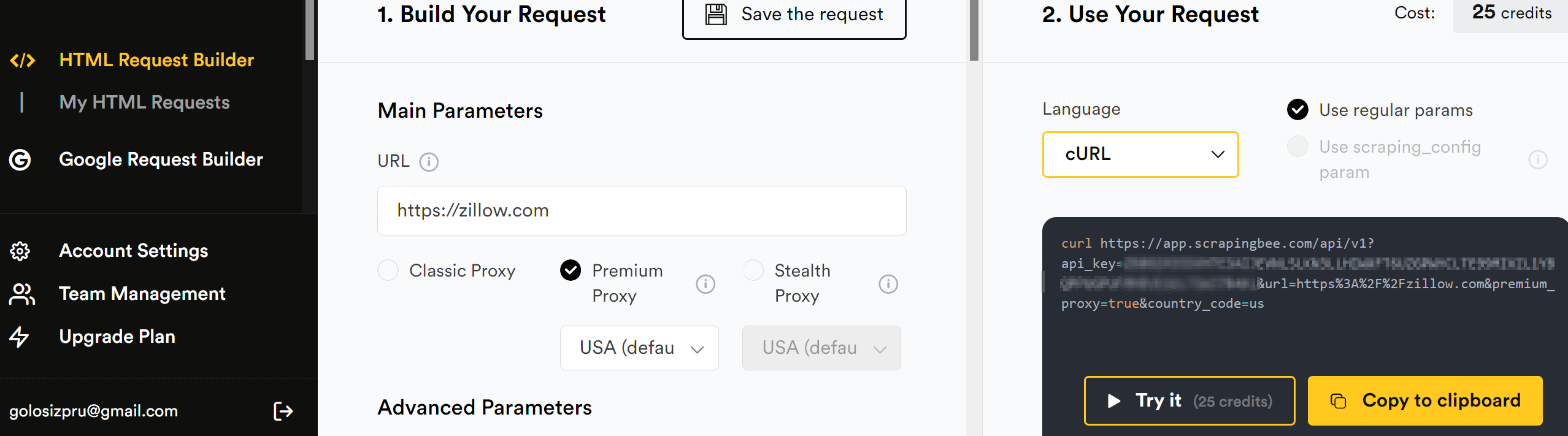
You can also use the HTML Request Builder to test your requests right in the browser.
Using ScrapingBee with Python
ScrapingBee provides an official Python client to make things even easier. Install it:
pip install scrapingbee
And use it like this:
from scrapingbee import ScrapingBeeClient

client = ScrapingBeeClient(api_key='YOUR_API_KEY')

response = client.get(
  'https://zillow.com',
  params={
    'premium_proxy': True,
    'country_code': 'us'
  }
)

response.text
For PerimeterX protected websites, you'll want to turn on the premium proxy option. These proxies are harder to block and work better on sites with strong anti-bot systems.
If that's still not enough, you can also try our stealth proxy feature. It's made for really tough websites and helps you avoid detection even when other proxies fail.
Once you get the response, you can pass the HTML to something like BeautifulSoup and extract the data. In many cases, there's no need to mess with browser automation.
Zillow scraper using ScrapingBee and BeautifulSoup
This script uses ScrapingBee to scrape Zillow's for-sale listings page and parses the results with BeautifulSoup.
from scrapingbee import ScrapingBeeClient
from bs4 import BeautifulSoup

client = ScrapingBeeClient(api_key='YOUR_API_KEY')

response = client.get(
  'https://www.zillow.com/homes/for_sale/',
  params={
    'premium_proxy': True,
    'render_js': True,
    # Optional for debugging:
    # 'screenshot': True,
    'country_code': 'us'
  }
)

soup = BeautifulSoup(response.text, 'html.parser')

# Extract total result count
results_box = soup.select_one('#grid-search-results .result-count')
if results_box:
    total_results = results_box.text.strip()
    print(f"Total results: {total_results}")
else:
    print("Could not find result count.")

# Extract first few listings
cards = soup.find_all(attrs={'data-test': 'property-card'})
print("\nFirst five listings:")

for card in cards[:5]:
    price_tag = card.find(attrs={'data-test': 'property-card-price'})
    price = price_tag.text.strip() if price_tag else 'N/A'

    link_tag = card.find(attrs={'data-test': 'property-card-link'})
    link = link_tag['href'] if link_tag and link_tag.has_attr('href') else 'N/A'

    print(f"- {price} — {link}")
If you don't have BeautifulSoup installed on your PC, install it with:
pip install beautifulsoup4
So, this script:
Connects to ScrapingBee using your API key and requests the Zillow for-sale page.
premium_proxy: Uses high-trust proxies that are less likely to get blocked.render_js: Tells ScrapingBee to render JavaScript on the page (Zillow requires this).screenshot: Requests a screenshot of the page (optional).country_code: Forces proxy location (in this case, the US).
Parses the HTML returned in
response.textusing BeautifulSoup.Finds the total number of listings:
- Looks for an element with class
.result-countinside the container with ID#grid-search-results. - This typically contains text like
1,243 Homes.
- Looks for an element with class
Extracts individual listing cards:
- Finds all elements with
data-test="property-card"— each one is a single home listing.
- Finds all elements with
From each card, it pulls:
- The price from a
spanwithdata-test="property-card-price"(e.g.$79,900). - The link from an
atag withdata-test="property-card-link"(usually nested somewhere in the card).
- The price from a
The script prints:
- The total number of listings found.
- The price and link for the first five homes on the page.
Use a stealthy headless browser
If you're building your own scraping setup and want full control — but still need to get past PerimeterX — using a stealth browser is one of the best options. That's where Camoufox comes in.
Camoufox is a custom version of Firefox made for serious scraping. It's built to act like a real user (down to the smallest details) without using weird JavaScript tricks that can break or get you flagged. Think of it as Playwright or Puppeteer's sneaky cousin that knows how to stay invisible.
Here's what it does out of the box:
- Hides all the usual fingerprint clues (browser, OS, screen size, timezone, fonts, WebGL, and more)
- Changes fingerprints every session so it doesn't look like the same bot over and over
- Simulates human-like mouse movement and turns off distracting stuff like CSS animations
- Works with Playwright-style scripts
Camoufox is one of the best tools out there if you want to look like a normal user on sites that use PerimeterX protection.
Learn how to use Camoufox in our tutorial.
Getting started
First, install Camoufox with the optional geoip support (recommended if you're using proxies):
pip install camoufox[geoip]
Next, download the actual browser:
camoufox fetch
Then you can use it in your script just like you would with Playwright:
from camoufox.sync_api import Camoufox

with Camoufox() as browser:
    page = browser.new_page()
    page.goto("https://example.com")
You can also customize the fingerprint to match a specific OS or pick randomly from a list:
with Camoufox(os=["windows", "macos", "linux"]) as browser:
    # ...
That's it — Camoufox handles the rest. It helps randomize fingerprints between sessions and is designed to reduce detection in real-world scraping setups.
Zillow scraper using Camoufox + BeautifulSoup
This version uses Camoufox, a stealthy headless browser based on Firefox, to open the Zillow listings page just like a real user. It then uses BeautifulSoup to parse the HTML and extract data.
from camoufox.sync_api import Camoufox
from bs4 import BeautifulSoup
import time

# ScrapingBee proxy credentials
SB_USER = "YOUR_SCRAPING_BEE_TOKEN"
# JS will be handled by Camoufox
SB_PARAMS = "render_js=false&premium_proxy=true"  # can add more params
SB_PROXY = {
    "server": "https://proxy.scrapingbee.com:8887",
    "username": SB_USER,
    "password": SB_PARAMS,
}

with Camoufox(geoip=True, os=["windows", "macos", "linux"], proxy=SB_PROXY) as browser:
    context = browser.new_context()
    page = context.new_page()

    # Zillow search URL for New York
    zillow_url = (
        "https://www.zillow.com/new-york-ny/"
    )

    page.goto(zillow_url, wait_until="networkidle")
    page.wait_for_timeout(4000)  # extra buffer

    # light human‑like scroll
    for _ in range(2):
        page.mouse.wheel(0, 600)
        time.sleep(1)

    soup = BeautifulSoup(page.content(), "html.parser")

    # total results
    count = soup.select_one("#grid-search-results .result-count")
    print("Total results:", count.text.strip() if count else "N/A")

    # first five listings
    cards = soup.find_all(attrs={"data-test": "property-card"})
    print("\nFirst five listings:")
    for card in cards[:5]:
        price = card.find(attrs={"data-test": "property-card-price"})
        link = card.find(attrs={"data-test": "property-card-link"})
        print(f"- {price.text.strip() if price else 'N/A'} — {link['href'] if link else 'N/A'}")
What it does:
Launches Camoufox:
- Starts a stealth Firefox instance that mimics real users.
- In this example we also use ScrapingBee premium proxy but you can simply remove the
proxy=SB_PROXYpart or use your own proxy instead. - Uses
page.goto(...)to open the Zillow page.
Waits for JavaScript content to load:
page.wait_for_timeout(4000)pauses the script for 4 seconds.- This gives Zillow time to render dynamic content (like listings).
Gets the full page HTML:
page.content()returns the rendered HTML.- Passed into BeautifulSoup for parsing.
Extracts the total number of listings:
- Looks for an element with class
result-countinside#grid-search-results.
- Looks for an element with class
Finds individual home listings:
- Selects elements with
data-test="property-card"— these are the listing containers.
- Selects elements with
From each card, it grabs:
- The price, from a
spanwithdata-test="property-card-price". - The link, from an
atag withdata-test="property-card-link"(if present).
- The price, from a
Other stealth browser tools
Camoufox is a solid choice, but it's not the only tool out there. If you're using a different setup or just want other options, here are a couple more stealth tools to check out:
- undetected-chromedriver (aka "ucd") is a tweaked version of Selenium's ChromeDriver that hides most of the usual signs of automation. It fixes
navigator.webdriver, adjusts internal values, and acts enough like a real browser to fool many bot checkers. It works well with existing Selenium code, but it's tied to Chrome and can feel a bit heavier than newer tools. Learn more in our undetected-chromedriver tutorial. - If you're using Playwright, you can add a stealth plugin that was first made for Puppeteer. It helps patch common fingerprinting leaks and smooths out automation behavior. It's not as deep as Camoufox when it comes to spoofing, but it's light, simple, and good enough for a lot of sites — especially if you combine it with decent proxies and realistic scraping logic. Learn more in our Playwright Stealth tutorial.
Reverse engineer it yourself
If you like digging into the technical stuff and have the time (and patience), you can try reverse engineering PerimeterX yourself. It's definitely not the easiest path, but it gives you full control over how your scraper works.
In short, this means figuring out what PerimeterX scripts do in the browser: what data they collect, how they calculate the trust score, and what triggers the HUMAN Challenge. Most of this happens in obfuscated JavaScript on the client side, so you'll need to read messy code, track network requests and follow how the scripts run.
Here are some tips if you want to explore this route:
- Use browser DevTools to inspect scripts and watch what they're doing
- Look for strange or delayed network requests — big blobs of data usually mean behavioral info being sent to their servers
- Check cookies, local storage, and session storage — some values might relate to risk scores or challenges
- Compare how a normal browser behaves vs a bot setup — and spot the differences
You probably won't be able to copy everything PerimeterX does — a lot of it runs on their servers, which you can't see. But even just figuring out the client-side behavior can help you build your own workaround for specific sites. Just remember: this stuff changes often! PerimeterX updates their system regularly, so if you go down this path, expect to keep fixing things as they break.
Ready to try ScrapingBee for PerimeterX bypass?
If you don't want to deal with proxies, TLS quirks, fingerprinting, session handling, and all the moving parts yourself, ScrapingBee handles it for you. Just send a request, and it takes care of the rest — making it much easier to work with perimeterx protected pages without building and maintaining a complex scraping stack.
It's designed to reliably handle protected sites out of the box, so you can focus on extracting data instead of debugging blocks. You also get a free trial (no credit card required), so you can test it immediately.
👉 Sign up for a free trial or check the pricing to get started.
PerimeterX bypass FAQs
Is there a way to tell if a site uses PerimeterX?
Sometimes. Look at the page source or network traffic. If you see things like pxhd cookies, px.js, perimeterx.net, or HUMAN branding, you're probably dealing with it. If you get the "Press & Hold" box, that's obviously a clear sign too. But sometimes it runs quietly in the background with no warning and it's somewhat hard to spot.
Can we completely bypass PerimeterX?
You can often avoid getting caught or at least reduce how often you get flagged. But fully bypassing PerimeterX forever? Probably not. It keeps changing and learning. You tweak something, it adjusts — and the cat-and-mouse game continues. No single trick works forever.
Is it legal to scrape sites protected by PerimeterX?
Scraping publicly available data is generally considered legal in many jurisdictions, as long as it doesn't harm the website or clearly violate its terms of use. However, scraping private or restricted data (for example, content behind login walls) is not allowed and may breach data privacy laws.
Actively bypassing security mechanisms like PerimeterX can also raise legal risks and may fall under laws such as the Computer Fraud and Abuse Act (CFAA) in the U.S. This isn't legal advice, but the safest approach is to scrape responsibly, respect site policies, and make sure your use case stays compliant with applicable laws.
Can't we just use cached versions of websites?
You could try scraping Google Cache or the Wayback Machine, but most of the time, those pages are outdated, missing parts, or don't show dynamic content. They also won't help with stuff that changes often, like prices or product stock. They're fine for quick testing, but not great for real scraping work.
What happens if my scraper gets blocked?
You'll usually see challenge pages, weird redirects or just no data. Some pages might not load at all. When that happens, double-check your setup: maybe it's your IP, headers, speed, or something in the behavior. Even small changes — like using a different proxy or slowing down — can help.
Do I need all these tricks for every site?
Nope! Most websites don't use heavy bot protection. If you're scraping a smaller site, basic tools might be enough. Don't make things harder than they need to be — save the advanced tools for the tough ones.
Conclusion
HUMAN or PerimeterX bypass isn't easy — and that's the point. It's made to stop bots and it does a solid job. But with the right tools and a smart approach, it's still possible to get through. Whether you use a scraping API, a stealth browser like Camoufox, or go full DIY, the key is knowing how the system works, and avoiding its red flags.
And as always: scrape responsibly. Some sites just aren't worth the hassle. But when you do need to take on the big ones, now you've got a few solid tools in your kit.
Good luck, and may your scrapers stay under the radar.
Before you go, check out these related reads:

Ilya is an IT tutor and author, web developer, and ex-Microsoft/Cisco specialist. His primary programming languages are Ruby, JavaScript, Python, and Elixir. He enjoys coding, teaching people and learning new things. In his free time he writes educational posts, participates in OpenSource projects, tweets, goes in for sports and plays music.