In this blog post, I'll show you how to scrape google news with Python and our Google News scraper, even if you're not a Python developer. You'll start with the straightforward RSS feed URL method to grab news headlines in structured XML. Then I'll show you how ScrapingBee's web scraping API, our Google News API, and even our Google Search Results API can extract public data.
By the end of this guide, you'll have an easy access to the every news title you need without getting bogged down in complex infrastructure. Let's begin!

Quick Answer (TL;DR)
Need a quick start? The most efficient way to scrape is with ScrapingBee's Google News Scraper API. It handles JavaScript rendering, proxy rotation, user agent management, and parsing for you.
This web scraping tool saves you from dealing with complex anti-bot measures, import requests and HTML data extraction. Use the code below to give it a try:
from scrapingbee import ScrapingBeeClient

client = ScrapingBeeClient(api_key='YOUR-API-KEY')
response = client.get(
    url="https://app.scrapingbee.com/api/v1/google",
    params={
        "search": "artificial intelligence",
        "search_type": "news",
        "country_code": "us"
    }
)
print(response.json()['organic_results'])
This approach to scraping news results will help you gather valuable data for your projects without third-party APIs or worrying about handling response codes yourself. And if you also need to extract images related to your news topics — such as thumbnails, charts, or visual context — you can pair your workflow with our Google Image Scraper API to automatically pull Google Images alongside your news data.
Google News Scraping Methods
Before diving into code, it helps to understand the full landscape of approaches available to you. Each method differs in complexity, reliability, and use case, from simple requests to full browser automation.
Here's a high-level overview of the four main methods we'll cover:
- RSS Feeds (easiest): Google News exposes structured XML feeds that require no JavaScript handling and minimal setup. Perfect for beginners and lightweight monitoring tasks.
- Scraping Google News Results Pages: This involves sending HTTP requests directly to the Google News search results page, parsing HTML responses, and extracting the news elements you need. A solid mid-level option.
- Scraping news.google.com: The actual Google News website is heavily JavaScript-driven. You'll need a browser automation tool like Selenium or Playwright to load and interact with it.
- Using a Scraping API (most reliable): Delegating the heavy lifting to a purpose-built API like ScrapingBee's Google News Scraper. This is the most production-ready approach and the one I recommend for scale.
Choose the method that fits your project's needs. If you're just getting started, RSS is the right call. If you need complete data at scale with minimal maintenance, go straight to Method 4.
Using Google News RSS Feeds (easiest)
RSS feeds are the simplest and most beginner-friendly way to get structured news data from Google without dealing with HTML or JavaScript. Google exposes an RSS endpoint that returns clean XML containing headlines, links, publication dates, and source names. No API key is required, no JavaScript rendering is needed, and the format is stable enough that it rarely breaks when Google updates their front-end. If you want a fully managed solution, ScrapingBee also offers an rss feed scraper that handles this for you.
The main limitation is coverage. RSS feeds don't give you everything the full Google News interface does: there's no pagination, no image data, and the query customization options are limited.
Scraping Google News Results Pages
This method involves scraping directly from Google's search results by appending a tbm=nws parameter to a standard Google search URL. It gives you more flexibility than RSS when RSS isn't sufficient, for example when you need to filter by date range, country, or language with more granularity. It also lets you retrieve more results per query. ScrapingBee also offers a dedicated news results api if you'd rather skip the HTML parsing entirely.
The tradeoff is that it requires handling page structure, selectors, and occasional changes to how Google renders those results.
Scraping news.google.com
This approach targets the actual Google News website interface, which is heavily driven by JavaScript. That means a plain HTTP request won't get you the rendered content, so you'll need a browser automation tool like Selenium or Playwright to launch and control a real browser instance, wait for content to load, and then extract what you need.
When content isn't accessible via simple requests, this method covers you.
Using a Scraping API (most reliable)
Scraping APIs eliminate the need to manage scraping infrastructure entirely. Instead of building and maintaining your own solution, you send a request to an API endpoint and it returns clean, structured data. ScrapingBee's Google News Scraper handles JavaScript rendering, proxy rotation, anti-bot protection, and parsing automatically, so you can focus on using the data rather than fighting to collect it.
For production-grade, large-scale data collection, this is the path of least resistance.
Set Up Your Python Environment
Before diving into web scraping Google News, let's establish a clean, isolated environment for your project. This step is crucial because it ensures your scraper works consistently across different platforms (Windows, macOS, Linux) and prevents dependency conflicts with other projects.
Let's walk through the setup process to create a clean, isolated environment for your Python web scraping project.
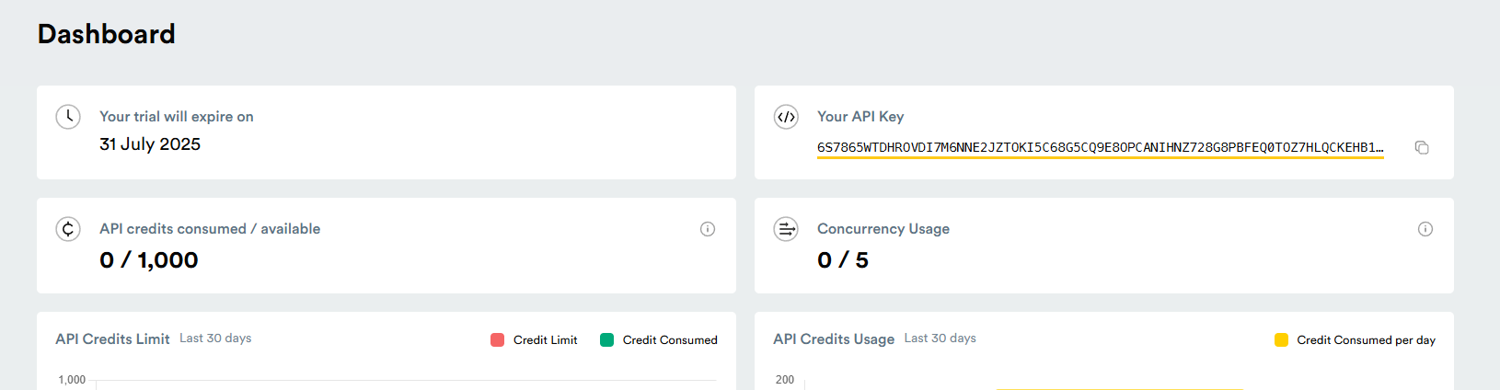
Get your API key
To use ScrapingBee, you'll need an API key:
- Sign up at ScrapingBee.com
- Navigate to your dashboard
- Copy your API key from the account section
Install Python and required libraries
Before creating a virtual environment, ensure you have Python installed on your system. Download the latest version from python.org if needed. Verify your installation by running this command in your terminal window:
python --version
# or on some systems
python3 --version
You should see output showing Python 3.6 or higher. Next, make sure pip (Python's package manager) is installed and updated:
python -m pip install --upgrade pip
Create and activate a virtual environment
Now that you have your Google news scraper Python up and ready, you can create a new environment with these commands in your project directory:
# For Windows
python -m venv venv
venv\Scripts\activate

# For macOS/Linux
python -m venv venv
source venv/bin/activate
You'll notice your terminal window command prompt changes to indicate the active environment, showing you're working in an isolated space.
Install feedparser and pyshorteners
With your environment activated, we can now install the following libraries needed for your web scraper:
pip install feedparser pyshorteners
Feedparser will handle the RSS parsing, while pyshorteners will help us create more readable links in your output. The requests library will help with HTTP import requests when we need to go beyond RSS feeds. You can verify the installations with:
pip list
Great, your environment is ready. It's time to get into scraping.
Method 1: Scrape Google News Using RSS Feeds
This is the simplest working implementation. We'll construct an RSS URL, parse the feed using feedparser, and extract structured fields with just a few lines of Python. Great for beginners and quick-start monitoring.
Find the correct RSS feed URL
The first step is constructing the appropriate RSS feed URL. Here is the base format:
https://news.google.com/rss/search?q=your+search+term
Replace "your+search+term" with keywords (use + sign for spaces). Being specific with your search terms yields better news results: "electric vehicle batteries" will return more focused content than just "electric vehicles."
Use these parameters to further refine your search results:
- hl=[language-code] - Interface language (e.g., en-US, fr, es)
- gl=[country-code] - Geographic location (e.g., US, UK, CA)
- ceid=[country]:[language] - Edition ID
For instance, to get Canadian tech news in French:
https://news.google.com/rss/search?q=technologie&hl=fr-CA&gl=CA&ceid=CA:fr
Parse the feed using feedparser
The feedparser library transforms complex RSS XML into Python-friendly objects without requiring you to handle XML parsing manually.
import feedparser

search_term = "climate change"
query = search_term.replace(" ", "+")
feed_url = f"https://news.google.com/rss/search?q={query}"
news_feed = feedparser.parse(feed_url)

print(f"Feed title: {news_feed.feed.title}")
print(f"Articles found: {len(news_feed.entries)}")
Feedparser handles HTTP requests, XML parsing, character encoding, and data normalization, including different RSS format versions, without any additional configuration.
Extract title, link, date, and source
At this point, you're ready to extract specific data fields from each news article. Google News appends the source publication name after the news title, separated by a dash:
import datetime

for i, entry in enumerate(news_feed.entries[:5], 1):
    title_parts = entry.title.split(" - ")
    clean_title = " - ".join(title_parts[:-1])
    source = title_parts[-1] if len(title_parts) > 1 else "Unknown"

    pub_date = datetime.datetime(*entry.published_parsed[:6]).strftime("%Y-%m-%d %H:%M:%S")

    print(f"Article {i}:")
    print(f"  Title: {clean_title}")
    print(f"  Source: {source}")
    print(f"  Published: {pub_date}")
    print(f"  Link: {entry.link}")
The published_parsed attribute gives you a time tuple you can convert to any date format you prefer. For production systems, I recommend storing both the original and formatted timestamps.
Method 2: Scrape Google News Results Pages
When you need more results or richer filtering than RSS provides, scraping the Google News search results page directly is the next step up. This method uses HTTP requests and HTML parsing, no browser required.
Send request or load page
Use the requests library to fetch the Google News results page. Adding realistic headers helps avoid immediate blocks. If you're new to this, check out our guide on how to send python requests before continuing:
import requests

headers = {
    "User-Agent": "Mozilla/5.0 (Windows NT 10.0; Win64; x64) AppleWebKit/537.36 (KHTML, like Gecko) Chrome/120.0.0.0 Safari/537.36"
}

search_term = "artificial intelligence"
url = f"https://www.google.com/search?q={search_term.replace(' ', '+')}&tbm=nws"
response = requests.get(url, headers=headers)
print(f"Status: {response.status_code}")
The tbm=nws parameter tells Google you want News results specifically. A 200 status means your request landed and you're ready to parse.
Parse HTML
Once you have the page content, use BeautifulSoup to parse html data and extract what you need:
from bs4 import BeautifulSoup

soup = BeautifulSoup(response.text, "html.parser")
Google's News results are rendered inside div elements with class names that can change. Inspect the page in your browser's developer tools to identify current selectors before building your extractor.
Extract news data
With your parsed soup object, target the relevant containers and pull the fields you need:
articles = []
for result in soup.select("div.SoaBEf"):
    title = result.select_one("div.MBeuO")
    link = result.select_one("a")
    source = result.select_one("div.CEMjEf span")
    date = result.select_one("span.OSrXXb")

    if title and link:
        articles.append({
            "title": title.get_text(),
            "link": link.get("href"),
            "source": source.get_text() if source else "Unknown",
            "date": date.get_text() if date else "Unknown"
        })

print(f"Extracted {len(articles)} articles")
Note: Google's class names change periodically. If your selectors stop returning results, inspect the live page and update accordingly.
Handle pagination
To collect more than one page of results, pass the start parameter to offset the results. For a deeper dive on this topic, see our guide on web scraping pagination:
import time

def scrape_page(search_term, start=0):
    url = f"https://www.google.com/search?q={search_term.replace(' ', '+')}&tbm=nws&start={start}"
    response = requests.get(url, headers=headers)
    soup = BeautifulSoup(response.text, "html.parser")
    # extract and return articles as above
    return articles

all_articles = []
for page in range(0, 50, 10):  # 5 pages
    all_articles.extend(scrape_page("artificial intelligence", start=page))
    time.sleep(2)  # respectful delay between requests
Keep delays between requests. Rapid sequential hits are the fastest way to trigger rate limiting or an IP block.
Method 3: Scrape news.google.com
The actual news.google.com website is a JavaScript-rendered single-page application. Simple HTTP requests return a skeleton HTML shell, not the article content you need. For this method, you'll use Selenium or Playwright to control a real browser, let it fully render the page, and then extract your data.
Load the Google News homepage
Start by launching a browser session and navigating to Google News:
from selenium import webdriver
from selenium.webdriver.chrome.options import Options
import time

options = Options()
options.add_argument("--headless")  # run without opening a browser window
options.add_argument("--no-sandbox")
options.add_argument("--disable-dev-shm-usage")

driver = webdriver.Chrome(options=options)
driver.get("https://news.google.com")
time.sleep(3)  # wait for initial render
Running in headless mode keeps things lightweight. The sleep gives the page time to load JavaScript-rendered content before you try to extract anything.
Handle dynamic content (JavaScript)
Content on news.google.com loads asynchronously, meaning some elements only appear after user interaction or after a delay. Use explicit waits rather than static time.sleep calls for more reliability. For a full breakdown of how to handle this, see our guide on scraping dynamic content:
from selenium.webdriver.common.by import By
from selenium.webdriver.support.ui import WebDriverWait
from selenium.webdriver.support import expected_conditions as EC

wait = WebDriverWait(driver, 10)
articles_container = wait.until(
    EC.presence_of_element_located((By.CSS_SELECTOR, "article"))
)
This waits up to 10 seconds for article elements to appear before proceeding, which is much more robust than a fixed delay.
Extract headlines, links, sources, and dates
Once the page is rendered and your target elements are present, pull the data:
articles = driver.find_elements(By.CSS_SELECTOR, "article")
news_data = []

for article in articles:
    try:
        title = article.find_element(By.CSS_SELECTOR, "h3, h4").text
        link = article.find_element(By.CSS_SELECTOR, "a").get_attribute("href")
        source = article.find_element(By.CSS_SELECTOR, "time").get_attribute("datetime")
        news_data.append({"title": title, "link": link, "published": source})
    except Exception:
        continue

driver.quit()
Wrapping each extraction in a try/except ensures that a single malformed article doesn't kill your entire scrape.
Handle pagination and infinite scroll
Google News uses infinite scroll rather than traditional pagination. To load more content, scroll the page down and wait for new articles to appear. You can find a more detailed walkthrough in our guide on how to handle infinite scroll:
def scroll_and_collect(driver, scrolls=5):
    all_articles = set()

    for _ in range(scrolls):
        driver.execute_script("window.scrollTo(0, document.body.scrollHeight);")
        time.sleep(2)

        articles = driver.find_elements(By.CSS_SELECTOR, "article h3")
        for a in articles:
            all_articles.add(a.text)

    return list(all_articles)
Using a set deduplicates headlines as you collect them across scroll events.
Method 4: Use a Scraping API (Fastest & Most Reliable)
If you're building anything intended for production, or you're just tired of chasing selector changes and managing proxy infrastructure, a dedicated scraping API is the right call. ScrapingBee's Google News Scraper handles everything: JavaScript rendering, proxy rotation, anti-bot protection, and structured data extraction.
When to use a scraping API
APIs become preferable over self-managed scrapers as soon as any of the following apply: you need reliable uptime without babysitting your scraper, you're dealing with JavaScript-heavy pages, you need to scale across many queries without managing IP rotation yourself, or you want clean structured output instead of raw HTML you still have to parse. If you've hit walls with Methods 2 or 3, Method 4 is where you land.
Make your first API request
from scrapingbee import ScrapingBeeClient

client = ScrapingBeeClient(api_key='YOUR-API-KEY')
response = client.get(
    url="https://app.scrapingbee.com/api/v1/google",
    params={
        "search": "cybersecurity breach",
        "search_type": "news",
        "country_code": "us"
    }
)
print(response.status_code)
print(response.json())
Replace YOUR-API-KEY with the key from your ScrapingBee dashboard. The search_type: "news" parameter routes the request through ScrapingBee's dedicated Google News pipeline.
Extract structured Google News data
The API returns clean JSON, with no HTML parsing required:
data = response.json()
results = data.get("organic_results", [])

for article in results:
    print(f"Title: {article.get('title')}")
    print(f"Source: {article.get('source')}")
    print(f"Link: {article.get('link')}")
    print(f"Date: {article.get('date')}")
    print("---")
Each result includes title, source, URL, date, and snippet fields out of the box. That's data you can immediately feed into analysis pipelines without additional cleaning.
Handle scaling and multiple queries
APIs simplify collecting large volumes of data across many searches. Loop through your query list with minimal overhead:
import time

topics = ["fintech regulations", "AI/RAG pipelines", "e-commerce fraud", "market intelligence"]
all_results = {}

for topic in topics:
    response = client.get(
        url="https://app.scrapingbee.com/api/v1/google",
        params={"search": topic, "search_type": "news", "country_code": "us"}
    )
    all_results[topic] = response.json().get("organic_results", [])
    time.sleep(1)
No proxy management, no rotating headers, no HTML parsing. Just clean results for each term.
Clean and Organize the Data
RSS feed scraping offers more stability than HTML scraping since the format rarely changes. However, the raw data still needs refinement before it's truly useful.
You need to remove unnecessary elements, standardize formats, and structure the data in a way that's easy to work with. Let's look at some essential extraction techniques for this web scraping project.
Remove source from headlines
Google News typically appends the source publication at the end of each headline, separated by a dash. To get clean headlines, you need to extract just the news article title:
def clean_headline(title):
    # Split on the last occurrence of " - "
    parts = title.split(" - ")
    if len(parts) > 1:
        return " - ".join(parts[:-1])
    return title

# Example usage
clean_title = clean_headline(entry.title)
This complete code handles cases where the headline itself might contain dashes, ensuring you only remove the source portion.
Format and structure the output
def structure_news_data(entries):
    structured_data = []
    for entry in entries:
        article = {
            'title': clean_headline(entry.title),
            'source': entry.title.split(" - ")[-1],
            'published': entry.published,
            'link': shorten_url(entry.link)
        }
        structured_data.append(article)
    return structured_data
Now you have data that is easier to process, store, and analyze in subsequent steps.
Shorten URLs for readability
Google News links are often long and contain tracking parameters. Using pyshorteners, you can create more manageable source URLs:
import pyshorteners

def shorten_url(url):
    shortener = pyshorteners.Shortener()
    try:
        return shortener.tinyurl.short(url)
    except:
        return url  # Return original if shortening fails

# Example usage
short_link = shorten_url(entry.link)
Now you have more readable links that are easier to share or display in reports when you extract data.
Export and Scale Your Scraper
Your Python web scraping approach can be easily scaled to handle multiple search queries. Once you've extracted and cleaned your results, you'll want to export data for later use and potentially expand your web scraper to monitor multiple topics.
Save data to a CSV file
A CSV file (Comma-Separated Values) are an excellent format for storing structured data. They're easy to create and can be opened in spreadsheet applications or imported into databases:
import csv

def save_to_csv(data, filename='google_news.csv'):
    # Get field names from the first dictionary
    if not data:
        return

    fieldnames = data[0].keys()

    with open(filename, 'w', newline='', encoding='utf-8') as csvfile:
        writer = csv.DictWriter(csvfile, fieldnames=fieldnames)
        writer.writeheader()
        writer.writerows(data)

    print(f"Data saved to {filename}")
This function creates a CSV file with headers matching your data structure and writes each article as a row. You can analyze the scraped data in tools like Google Sheets or Excel.
Now that you can store your data in a CSV file, let's expand your scraper to handle multiple search terms.
Scrape multiple search terms
Finally, you can monitor various news topics simultaneously, by creating a flexible function that processes a list of search terms:
def scrape_multiple_terms(search_terms):
    all_results = {}

    for term in search_terms:
        print(f"Scraping news for: {term}")
        feed_url = f"https://news.google.com/rss/search?q={term.replace(' ', '+')}"
        feed = feedparser.parse(feed_url)

        # Process and store results
        all_results[term] = structure_news_data(feed.entries)

        # Save term-specific results
        save_to_csv(all_results[term], f"{term.replace(' ', '_')}_news.csv")

    return all_results

# Example usage
topics = ["climate change", "artificial intelligence", "renewable energy"]
results = scrape_multiple_terms(topics)
You could easily extend this further by scheduling your Python script to run periodically, storing search results in a database, or adding email notifications for important news items.
Automate and schedule scraping
Pair ScrapingBee with a scheduler to run your scraper continuously. Using Python's schedule library:
import schedule
import time

def run_scrape():
    for topic in topics:
        response = client.get(
            url="https://app.scrapingbee.com/api/v1/google",
            params={"search": topic, "search_type": "news"}
        )
        # save results to database or CSV
        print(f"Scraped {topic}: {len(response.json().get('organic_results', []))} results")

schedule.every(6).hours.do(run_scrape)

while True:
    schedule.run_pending()
    time.sleep(60)
For production environments, consider a cron job, AWS Lambda, or a workflow tool like Apache Airflow for more robust scheduling and failure handling.
What Is Google News Scraping?
Google News scraping is the process of automatically extracting news data, such as headlines, links, publication dates, and source names, from Google News sources. Instead of manually reading through news pages, a scraper connects directly to Google's feeds or pages and pulls the data you need programmatically.
The term covers a range of approaches, from simple RSS feed parsing to full browser automation, but the goal is always the same: structured, machine-readable news data at scale, without manual effort.
What Data Can You Extract from Google News?
The main data points available from Google News include headlines, article URLs, source publication names, publication dates, snippets or summaries, and sometimes images. Depending on the method you use, you may also be able to extract topic categories, geographic filters, and related article clusters.
Keep it practical and aligned with what your code actually extracts. Don't promise fields that aren't reliably present across all news items.
Why Scrape Google News?
Google News aggregates content from thousands of publishers worldwide, making it an invaluable resource for data-driven decision making. By automating the extraction of news data, you gain access to real-time information that would be impossible to collect manually.
From tracking brand mentions to trend analysis in the stock market, Google News scraping opens up possibilities for businesses, researchers, and marketers alike. The structured nature of news data makes it perfect for analysis, visualization, and integration with other systems.
Now that you understand the overall value of scraping Google News, let's explore how it enables organizations to stay on top of rapidly evolving information landscapes.
Track real-time trends and events
For marketing teams, real-time data allows identifying viral topics for timely content creation that captures peak interest. Research analysts can track breaking industry developments to update forecasts and reports. If you also want to analyze how interest rises or falls over time, you can pair your scraped news data with our Google Trends API for deeper trend insights.
The time-sensitive nature of news data is what makes automated media monitoring particularly valuable. Without it, organizations often discover critical information too late to capitalize on opportunities or mitigate risks.
Use cases: sentiment analysis, brand monitoring, research
Google News data serves as the foundation for numerous practical applications that can transform raw information into actionable insights:
- Brand Reputation Tracking: Monitor how your company is portrayed across thousands of news sources
- Competitive Intelligence: Track product launches, partnerships, and strategic moves by competitors
- Market Research: Identify emerging trends and consumer interests based on news coverage patterns
- Investment Research: Gather news about specific companies, sectors or the stock market to inform investment decisions
- Academic Studies: Analyze media coverage patterns for research on communication and journalism
These applications demonstrate why scraping Google News has become essential for organizations seeking data-driven advantages.
Limit results and handle errors
When scraping at scale, proper error handling is crucial. I recommend to always implement try/except blocks to gracefully handle empty feeds, connection problems, or api credentials issues:
import time

def scrape_with_error_handling(search_term, max_retries=3, delay=5):
    for attempt in range(max_retries):
        try:
            response = client.get(
                url="https://app.scrapingbee.com/api/v1/google",
                params={
                    "search": search_term,
                    "search_type": "news",
                    "nb_results": 20  # Limit results
                }
            )

            if response.status_code == 200:
                return response.json()
            elif response.status_code == 429:  # Too many requests
                print(f"Rate limit hit. Waiting {delay * (attempt + 1)} seconds...")
                time.sleep(delay * (attempt + 1))
            else:
                print(f"Error {response.status_code}. Attempt {attempt + 1}/{max_retries}")
                time.sleep(delay)
        except Exception as e:
            print(f"Exception: {e}. Attempt {attempt + 1}/{max_retries}")
            time.sleep(delay)

    return None  # Return None if all retries failed
Implementing this error handling approach transforms your scraping script from a fragile prototype into a production-ready tool.
Challenges When Scraping Google News
Google News isn't built to be scraped easily, and there are a few reliable obstacles you'll hit as your scraper matures.
Rate limits and blocking
Google monitors request frequency and will respond to aggressive scraping with CAPTCHAs, temporary IP bans, or silent result filtering. IP-based limits and anti-bot systems are the most common reasons requests fail after working initially. Keep delays between requests, use rotating proxies or an API service, and watch for 429 status codes as your early warning signal.
Dynamic content
A significant portion of Google News is loaded via JavaScript after the initial page request, meaning the HTML you get from a raw HTTP call may be missing the content you actually want. This is why Methods 3 and 4 exist; browser automation and scraping APIs handle JavaScript rendering so you don't have to build and maintain that infrastructure yourself.
Changing page structure
Google frequently updates its page layouts, which can silently break CSS selectors and XPath expressions your scraper depends on. A scraper that worked perfectly last month can stop returning results with no error message; it just extracts nothing because the class name changed. Build in monitoring and alerts for unexpectedly empty result sets, and document your selector logic so it's easy to update.
How to Avoid Getting Blocked
Avoiding detection is part of building a scraper that stays working. Here are the practical measures that actually matter. For a comprehensive deep dive, check out our full guide on how to avoid getting blocked.
Use headers and user agents
Setting realistic headers helps make your requests look like real browser traffic rather than automated scripts:
headers = {
    "User-Agent": "Mozilla/5.0 (Windows NT 10.0; Win64; x64) AppleWebKit/537.36 (KHTML, like Gecko) Chrome/120.0.0.0 Safari/537.36",
    "Accept-Language": "en-US,en;q=0.9",
    "Accept": "text/html,application/xhtml+xml,application/xml;q=0.9,*/*;q=0.8"
}
Rotate between several realistic user agent strings if you're running high-volume scrapers.
Use proxies
Rotating IP addresses reduces the risk of blocking during repeated requests. Each request appears to come from a different location, making it much harder for Google to fingerprint your scraper:
proxies = {
    "http": "http://your-proxy-ip:port",
    "https": "http://your-proxy-ip:port"
}
response = requests.get(url, headers=headers, proxies=proxies)
For large-scale work, use a proxy pool rather than a single proxy; single proxies get flagged quickly. ScrapingBee handles proxy rotation automatically if you'd rather not manage this yourself.
When to use browser automation
Browser automation becomes necessary when simple requests fail and content won't load without JavaScript execution. Selenium and Playwright both bypass JavaScript challenges by running a full browser environment. The tradeoff is resource cost; headless browsers are slower and heavier than plain HTTP requests. Use browser automation when you need it, and lean on a scraping API for scale, since running dozens of parallel headless browser instances is where self-managed solutions start breaking down.
Get Clean Google News Data with ScrapingBee
Web scraping is like a delicate dance - too aggressive, and we'll be blocked; too timid, and you won't get the data you need. By using ScrapingBee's Google News Scraper API, you avoid all these challenges. Our API handles proxy rotation, JavaScript rendering, and browser fingerprinting for you, so you can focus on using the data rather than fighting to collect it.
ScrapingBee offers 1,000 free API credits when you sign up, which is perfect for testing the service and seeing how it works with your specific use case. If you're serious about scraping Google News at scale, our paid plans provide reliable access with excellent support. Get started now!
Google News scraping FAQs
Is scraping Google News legal?
While web scraping itself isn't illegal, it's important to respect terms of service and copyright laws. ScrapingBee helps ensure compliance by following proper scraping etiquette. For commercial use, consult Google News legal guidelines and a legal professional about your specific use case.
Can I scrape Google News without coding?
Yes! ScrapingBee offers a no-code solution through our user interface, where you can set up Google News scraping without writing a single line of code. This is perfect for non-developers who need to extract news data regularly.
How often can I scrape Google News?
ScrapingBee handles rate limiting for you, but as a best practice, avoid excessive scraping. For real-time monitoring, scraping once every few hours is usually sufficient unless you have specific high-frequency needs.
How to scrape Google News results using multiple keywords?
The most efficient approach is to use the batch processing method shown earlier, where you loop through keywords while implementing proper delays between requests. ScrapingBee's API is designed to handle this type of usage efficiently.
What's better, scraping Google News using Python or API?
For simple, low-volume tasks, a Python-based RSS or requests approach works well and costs nothing. For production use, a scraping API is the better call; it handles JavaScript rendering, proxy rotation, and anti-bot measures automatically, saving significant maintenance time and delivering more reliable results at scale.
Before you go, check out these related reads: